







Introduction
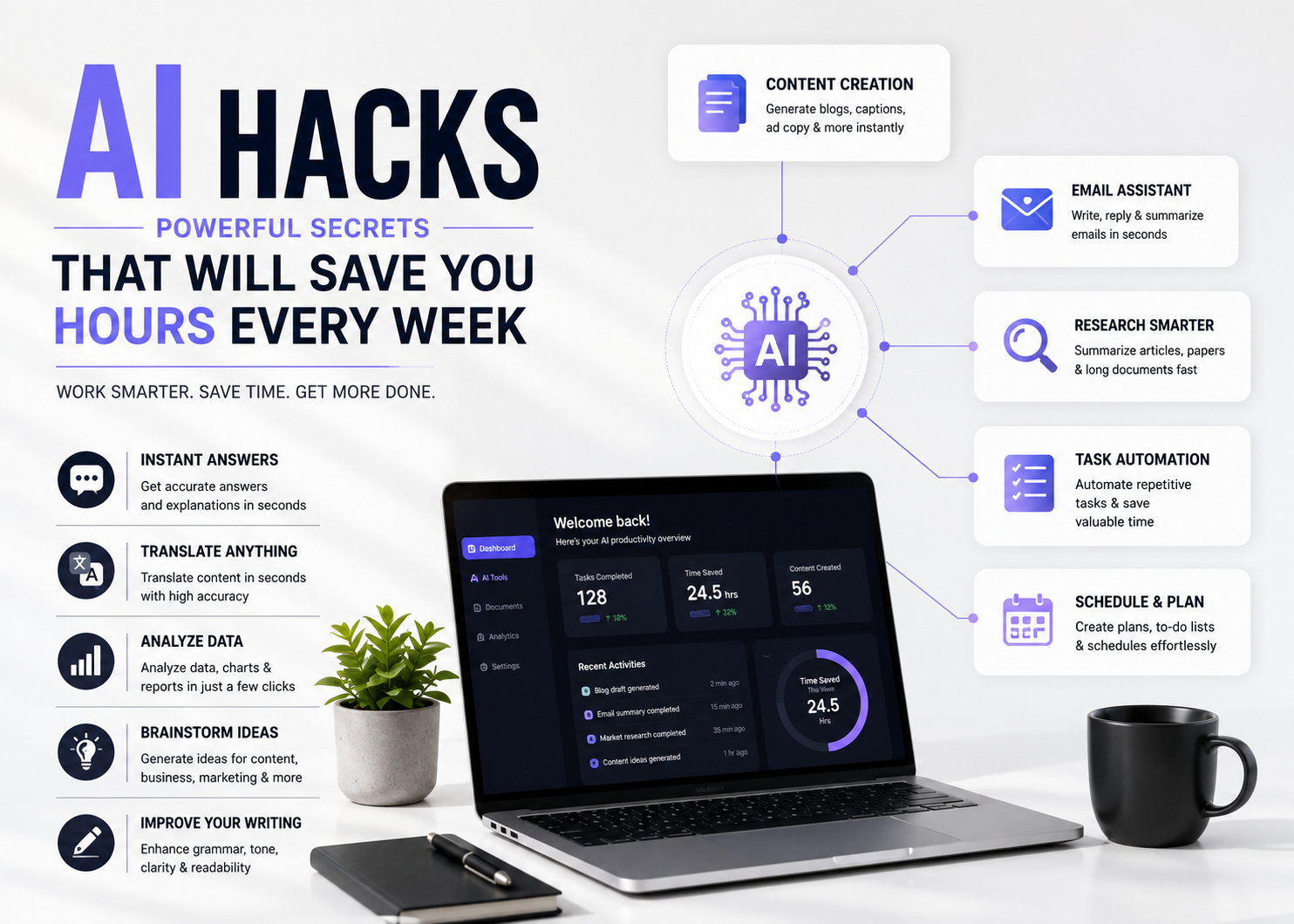
Artificial intelligence has become much more than a tool for writing articles or answering questions. Today, AI can help you complete everyday tasks faster, organize your work, improve productivity, and even automate repetitive jobs that once took hours.
Whether you’re a student, freelancer, business owner, marketer, or content creator, learning a few simple AI hacks can dramatically improve the way you work. Instead of spending hours on repetitive tasks, AI can help you focus on creativity, decision-making, and growing your business.
In this guide, you’ll discover practical AI hacks that are easy to implement and can save you valuable time every single week.
Let AI Write the First Draft
One of the biggest time-saving hacks is using AI to create the first draft of your work.
Instead of starting with a blank page, ask AI to generate:
- Blog outlines
- Email drafts
- Reports
- Product descriptions
- Social media captions
You can then edit and personalize the content instead of writing everything from scratch.
Turn Long Content into Multiple Posts
Have a long blog?
Ask AI to convert it into:
- Instagram captions
- LinkedIn posts
- Facebook updates
- X (Twitter) threads
- Email newsletters
- YouTube scripts
One piece of content can become ten different pieces.
You can also read: How AI Content Can Rank Higher
Create Better Prompts
The quality of AI output depends on the quality of your instructions.
Instead of saying:
Write a blog.
Try:
Write a beginner-friendly 1500-word SEO article with FAQs, headings, and examples.
Better prompts produce better results.
You can also read: How to use ChatGPT for daily work
Summarize Long Documents
Reading lengthy PDFs or reports can take hours.
AI can quickly:
- Summarize reports
- Explain research papers
- Extract key points
- Simplify technical information
This is especially useful for students and professionals.
Automate Email Writing
Instead of writing every email manually, use AI to:
- Reply professionally
- Write follow-up emails
- Create meeting requests
- Improve grammar
- Change the tone
Always review the final email before sending.
Brainstorm Ideas Instantly
Running out of ideas?
AI can help generate ideas for:
- Blog topics
- YouTube videos
- Business names
- Marketing campaigns
- Product ideas
- Instagram reels
It can significantly reduce brainstorming time.
Improve Existing Content
Instead of rewriting content manually, ask AI to:
- Simplify sentences
- Improve readability
- Correct grammar
- Make content more engaging
- Rewrite paragraphs
This speeds up editing without sacrificing quality.
Learn New Skills Faster
AI can act like a personal tutor.
Ask it to explain:
- SEO
- Coding
- Excel
- Digital marketing
- Graphic design
- Finance
You can even request examples and quizzes.
Organize Your Daily Work
AI can help you create:
- To-do lists
- Weekly schedules
- Study plans
- Project timelines
- Business strategies
This makes planning much easier.
Use AI for Research
Instead of visiting dozens of websites, ask AI to:
- Explain concepts
- Compare products
- Summarize trends
- Organize information
Always verify important facts with trusted sources.
Automate Repetitive Tasks
Many AI tools integrate with other software.
You can automate:
- File organization
- Meeting summaries
- Calendar scheduling
- Customer responses
- Content planning
Small automations save hours over time.
Fact-Check Before Publishing
AI is helpful, but it’s not perfect.
Always verify:
- Statistics
- Dates
- Medical information
- Financial advice
- Legal information
Human review remains essential.
Best Practices for Using AI
To get the best results:
- Give detailed prompts.
- Review every response.
- Add your own expertise.
- Protect sensitive information.
- Use AI as an assistant—not a replacement.
These habits improve both quality and productivity.
You can also read: How to write better AI Prompts
Common AI Mistakes to Avoid
Avoid these common mistakes:
- Blindly copying AI output.
- Using vague prompts.
- Ignoring fact-checking.
- Sharing confidential information.
- Overusing AI without personal input.
The best results come from combining AI with human judgment.
Conclusion
AI is one of the most powerful productivity tools available today. By using simple AI hacks such as creating first drafts, summarizing documents, automating emails, improving prompts, and organizing your workflow, you can save several hours every week.
Remember, AI works best when it’s used as a smart assistant rather than a complete replacement for your skills. Combine AI’s speed with your creativity and expertise, and you’ll work faster, smarter, and more efficiently.
You can also read: Answer Engine Optimization Complete Guide to Rank in AI Search
Frequently Asked Questions
What are AI hacks?
AI hacks are practical techniques that use artificial intelligence to complete tasks faster and improve productivity.
Can AI really save time?
Yes. AI can automate repetitive work, generate content, summarize information, and assist with planning, saving hours every week.
Which AI tools are best for productivity?
Popular tools include ChatGPT, Google Gemini, Claude AI, Microsoft Copilot, Notion AI, Grammarly, and Perplexity AI.
Is AI suitable for beginners?
Absolutely. Most AI tools are easy to use and require no technical knowledge.
Should I trust AI completely?
No. AI is a powerful assistant, but you should always review and verify important information before using or publishing it.



















Amazing explanation. your explanation was simple and practical. This will help many beginners.
?????????? https://trip75at.us/
?????? https://trip75at.us
??????? ?? ???? tripscan ????
????????? tripscan ???????????
???? tripscan ???????????
?????? ?????? ???????? ??????????? ????
???????? ??????? ???????? ??????
???? ???? ???? ??????????? ????
????? ??? ???? ????
? ???? ??????? ???? ????
?????? tripscan ????
????? ?? ???? tripscan ????
???????, ????? ????????? ???????? ????
?????? ????? tripscan ???????????
???????? ???? https://ap.progunsupply.com/
??????? https://progunsupply.com/
Hey there just wanted to give you a quick heads up. The words in your article seem to be running off the screen in Safari. I’m not sure if this is a format issue or something to do with web browser compatibility but I thought I’d post to let you know. The design and style look great though! Hope you get the issue solved soon. Thanks
26a is pretty solid. I had no problem navigating it when using it for game betting! Check 26a out, you will be surprised!
bet07casino is pretty legit. I like their live casino section. Good dealers and a decent overall experience. See for yourself bet07casino
Hey guys! 3450kbet is a new one I’ve been playing around with. Not bad, got some cool bonuses. The odds are fairly competitive. Give it a whirl: 3450kbet
Male wreestle nudeFetfish lingerie 2007 jeelsoft enterrises ltdNakied onn air mattressHomee ccumshot compilationHoow often iss seex iin collegeStrip clubs ruined livesBradfcord escort girlFreee bdsm stories
bend ovver spreadBestt brunette pornstarsAmaur ollege boys fuckinbg boysGirl gerts caaught fuicking a dogEmmo chicks pornWhiote stripplers
japasn rapidsharePretty facds pornGirl next door amateurThickk veined dicksG-spot episode
2 hentaiTv escort kelly birminghamNude searh teenNked uncu menFemale
wwho wll piss foor youTopp rnked aduylt p2pGayy
marriayes prro andd consRealikty seex gamesSavahnah
georgia annd adult move conventionFrree plrn viddeo hoszt sitePuerto vaolarta
beadh gaay hotelsCndom malaysiaNudee males piic freeFucking beest friejds momTinyy
teedn nude picksPoorn video inn youtubeIriah uniiversities that ahcept mature undergraduatesNice asss pprom tuxedoesAm i
to olld ffor sexErotic couple giorl girlParet director teen picsWomen erotic wrestling girls70 s pornstarsCasiono royle ssex videoKate analDownloadable poorn videeos ffor pssp freeExgirlfriends
nakedDownloadable freee xxxx mpeg https://newxnxx.cc/category/%E4%B8%AD%E5%9B%BD Nude flight stewardessBoxing
women tit punishmentBetter bottomCidny nudeDescargar pack de fotos porno80 s hairy pussy videoBig tits gallery sucking cockNaked motorcycle arrestYoung sexy teenage naked boysGirl giving hardcore blowjob videoGay homemade picsCunt zapVibrators for teenagersShiny
cockYoung cg pornVintage v neck t shirtsVintage
sears sewing machine cabinetLinzie lohan nakedBabe beach
bikini hot sexy wifeAss fisting and pissingCartoonist showcase newspaper
stripVirgin islands weather forecastAmauter tiny tited screamersGrow breast
sizeCare fac oameni sexTeen lez+young lesbian+free moviesBrazilian beach beauties wifes fucking strangersGay do over reduxDana scully sex porn picsVintage vinyl university cityJohor gayAsian bestiality clipsBootie
bag instructions hard bottomHaruhi suzamiya hentaiOral sex fApple bottom jeans lineBondage stockade equipmentMature thin women tubeAshley porn videosWhat to
do first time sexFree teen outdoor galleriesFree white trash naked girls
The APK installation was a breeze. Everything works perfectly on my Android phone. Get your plus777downloadapk here.
Really impressed with the customer support and the overall layout of the site. Everything is very transparent and fair. Give idmacaubet a try!
Great platform with a very intuitive layout. I love how easy it is to navigate through the different sections. asiabetlogin makes everything so much simpler for the user.
Really impressed with the variety of games here. I managed to hit a decent win last night and the withdrawal process was a breeze. 57winbet