







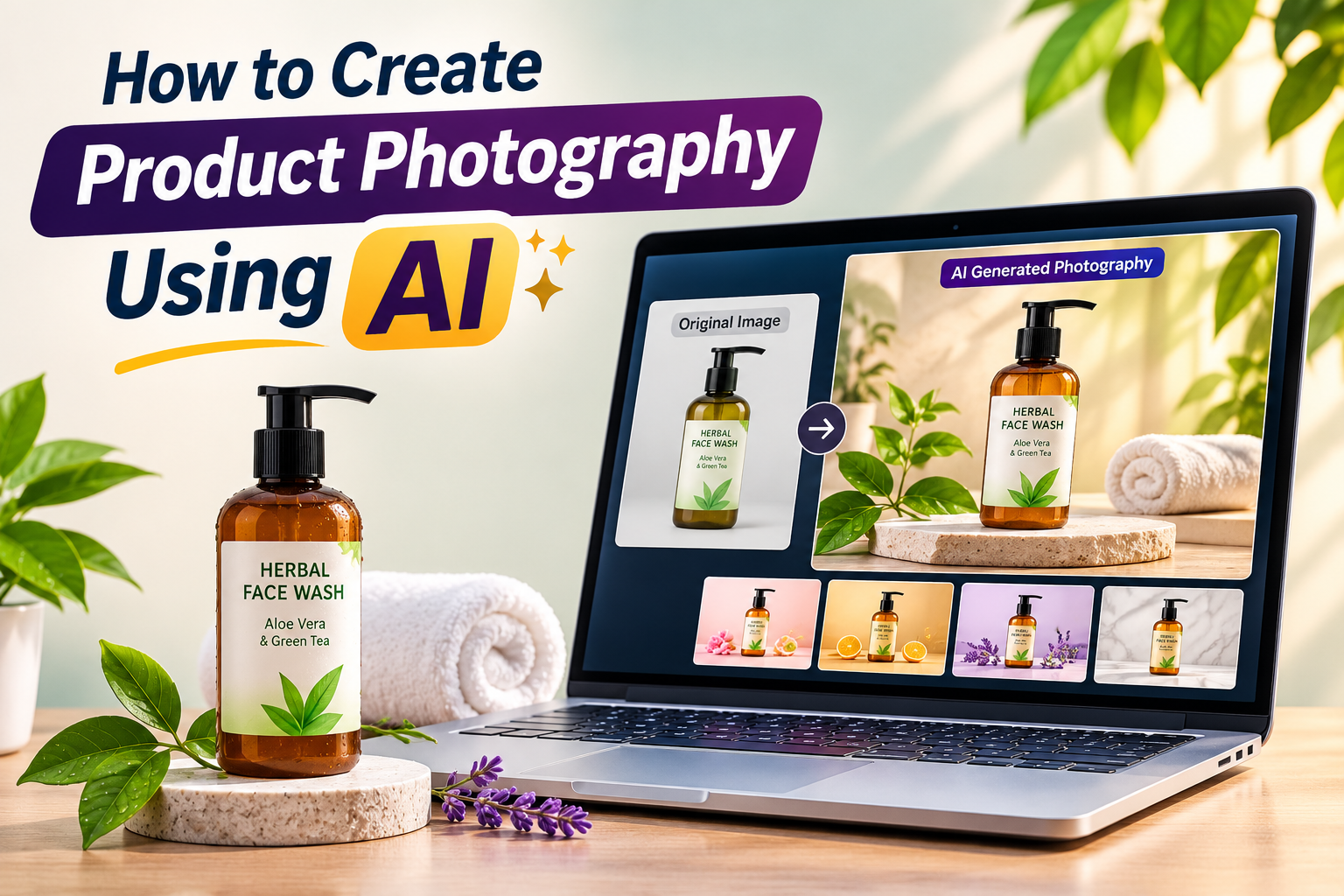
High-quality product photographs can make a big difference in how customers perceive a brand. Whether you sell jewellery, clothing, cosmetics, electronics, or home decor, attractive product images help people understand what you are offering and make your products look more appealing.
However, professional product photography can be expensive. Hiring photographers, arranging studio lighting, purchasing backgrounds, and editing images can take both time and money.
This is where AI product photography becomes useful.
With AI-powered image tools, you can turn a simple product photograph into a professional-looking visual by changing its background, adding realistic lighting, creating lifestyle scenes, and improving the overall presentation.
The best part is that you don’t always need advanced photography or graphic design skills to get started.
In this guide, you’ll learn how to create product photography using AI, which tools you can explore, how to write effective prompts, and how to avoid common mistakes.
What Is AI Product Photography?
AI product photography is the process of using artificial intelligence tools to create, edit, or enhance product images.
Instead of arranging a complete photography setup, you can upload an existing product photograph and use AI to place it in a different environment.
For example, imagine you sell a skincare product.
You take a simple photograph of a moisturiser bottle against a plain background. Using an AI image editing tool, you can create different scenes:
- The bottle placed on a luxury marble surface.
- The product surrounded by fresh flowers and natural ingredients.
- A clean studio setup with soft shadows.
- A lifestyle scene featuring bathroom accessories.
- A premium advertisement with carefully arranged lighting.
AI can help create these visuals without requiring you to photograph every scene separately.
However, AI-generated images should be checked carefully. Some tools may change product labels, packaging details, colours, or proportions. For commercial product photography, maintaining product accuracy is extremely important.
Why Should Businesses Use AI for Product Photography?
AI product photography offers several advantages, particularly for small businesses, online sellers, and marketing teams.
1. Reduce Photography Costs
Traditional product photography may require cameras, lighting equipment, studio space, and professional editing.
AI tools can help reduce these requirements by creating backgrounds and visual environments around existing product photographs.
You may still need a good original product image, but you can experiment with different creative settings without arranging a new photoshoot every time.
2. Create Multiple Backgrounds
A single product photograph can be used to create several visual concepts.
For example, a jewellery brand could display the same necklace in:
- A luxury golden setup.
- A minimal white studio.
- A festive decorative background.
- A floral arrangement.
- A premium dark background.
This gives businesses more creative options for advertisements, product listings, and social media campaigns.
3. Save Time
Creating every product scene manually can take hours.
AI editing tools can speed up tasks such as background removal, scene creation, image resizing, and visual enhancement.
This is particularly useful for businesses that regularly introduce new products.
4. Improve Social Media Marketing
Social media platforms rely heavily on visual content.
AI can help businesses create product images in different styles for Instagram posts, Facebook advertisements, promotional banners, and other marketing materials.
Instead of repeatedly using the same product photograph, you can experiment with different compositions and settings.
5. Create Lifestyle Product Images
Customers often want to understand how a product looks in a real-life setting.
For example:
- A sofa displayed in a modern living room.
- A perfume bottle placed on a dressing table.
- A coffee mug shown on a breakfast table.
- A handbag displayed in a stylish fashion setting.
AI can help create these lifestyle scenes and make product presentations more engaging.
Best AI Tools for Creating Product Photography
Several AI tools can help with different parts of the product photography process. The best choice depends on whether you want to generate a new scene, edit an existing image, remove a background, or create marketing visuals.
1. ChatGPT Image Generation
<bold>Best for:</bold> Creating creative product scenes and custom visual concepts.
ChatGPT’s image generation capabilities can help you create product-focused visuals from detailed instructions. You can describe the background, lighting, composition, camera angle, and overall style.
You can also provide a reference product image and request a new setting while asking the tool to preserve the product’s appearance.
For example, you could request a premium skincare advertisement featuring a bottle on a marble surface with soft natural lighting.
Always inspect the generated result to make sure the product’s original details remain accurate.
2. Adobe Firefly
<bold>Best for:</bold> AI-assisted image editing and creative background generation.
Adobe Firefly offers AI features for editing and generating visual content. Depending on the available features and plan, you can use it for tasks such as generative editing, background changes, and creative scene development.
It can be particularly useful when you want more control over an existing product photograph.
3. Canva
<bold>Best for:</bold> Creating marketing-ready product visuals.
Canva provides design tools and AI-powered features that can help with image editing, backgrounds, layouts, and promotional graphics.
You can use it to prepare product images for social media, advertisements, and online promotions.
You can also read: How to create and sell canva templates for passive income.
4. Photoroom
<bold>Best for:</bold> Product background removal and e-commerce images.
Photoroom focuses on product image editing. It can help remove backgrounds, create new backgrounds, and prepare product photographs for online stores.
It is especially useful for sellers who need consistent product images across multiple listings.
5. Pebblely
<bold>Best for:</bold> Creating lifestyle product backgrounds.
Pebblely is designed to help users generate product scenes and marketing visuals. It can be useful for placing products in different creative environments without arranging a complete physical setup.
Check each platform’s current features, pricing, usage limits, and commercial licensing terms before choosing a tool.
Step-by-Step Guide to Creating Product Photography Using AI
Now let’s understand the actual process.
You don’t need to use every AI tool mentioned above. Start with one that suits your requirements and follow these steps.
Step 1: Take a Clear Photograph of Your Product
Before using AI, you need a good-quality photograph of the actual product.
A clear source image gives AI tools a better reference to work with.
Follow these basic tips:
- Use a clean background.
- Keep the product in focus.
- Avoid strong shadows covering important details.
- Make sure the product is fully visible.
- Capture the original colours accurately.
- Take photographs from different angles if necessary.
For example, if you’re selling a perfume bottle, photograph its front label, cap, shape, and packaging clearly.
Avoid using blurry or heavily edited photographs as your starting point.
Step 2: Remove the Existing Background
Once you have your product photograph, remove its original background if you want to place it in a new environment.
You can explore background removal features in tools such as Canva, Photoroom, or Adobe’s image editing products.
Check the edges carefully after removing the background.
Pay particular attention to:
- Transparent packaging.
- Glass bottles.
- Jewellery chains.
- Hair and fabric edges.
- Fine product details.
These areas can sometimes be difficult for automatic background removal tools.
Step 3: Choose Your Product Photography Style
Before generating an image, decide what kind of presentation you want.
Different products work better with different visual styles.
Minimal Studio Photography
<bold>Best for:</bold> Electronics, cosmetics, skincare, and everyday products.
Use a plain background, balanced lighting, soft shadows, and a clean composition.
Luxury Product Photography
<bold>Best for:</bold> Jewellery, perfumes, watches, and premium accessories.
Use elegant surfaces, controlled lighting, rich textures, and carefully arranged decorative elements.
Lifestyle Photography
<bold>Best for:</bold> Furniture, home decor, clothing, and kitchen products.
Place the product in a realistic environment that shows how customers might use it.
Nature-Inspired Photography
<bold>Best for:</bold> Skincare, organic products, wellness products, and natural cosmetics.
Use natural textures, leaves, flowers, water, and soft daylight.
Step 4: Write a Detailed AI Prompt
The prompt plays an important role in the final result.
Instead of writing something general like “Create a beautiful product image,” explain exactly how you want the product to appear.
A good prompt should describe:
- The product and its appearance.
- Background and environment.
- Lighting direction and intensity.
- Camera angle and composition.
- Surface and decorative elements.
- Image dimensions and overall style.
- Details that must remain unchanged.
Here are some examples.
Example 1: Luxury Perfume Photography
Prompt:
“Create a premium commercial product photograph using the uploaded perfume bottle as the exact reference. Keep the bottle shape, cap, label, logo, colours, proportions, and all packaging details unchanged. Place it on a polished dark marble surface with subtle golden decorative elements in the background. Use elegant studio lighting, realistic reflections, soft shadows, and a luxury advertising aesthetic. Keep the perfume bottle as the main subject, sharply focused, with a clean composition.”
Example 2: Skincare Product Photography
Prompt:
“Create a professional skincare product photograph using the uploaded product image. Preserve the exact packaging, label, brand name, colours, and proportions. Place the product on a light beige stone surface surrounded by a few fresh green leaves and subtle water droplets. Use soft natural daylight, realistic shadows, and a clean premium skincare advertising style. Avoid excessive decoration and keep the product clearly visible.”
Example 3: Jewellery Product Photography
Prompt:
“Create a luxury jewellery advertisement using the uploaded necklace as the exact reference. Preserve the original design, stone arrangement, metal colour, chain structure, and all fine details. Display the necklace elegantly on a premium neutral velvet surface with subtle warm studio lighting. Use realistic reflections, detailed textures, and a sophisticated jewellery campaign aesthetic. Do not redesign, replace, or add any jewellery elements.”
The most important instruction in these prompts is to preserve the original product. AI should improve the presentation, not invent a different product.
Step 5: Generate Different Image Variations
Don’t stop after creating the first image.
Generate a few variations by changing the background, lighting, camera angle, or decorative elements.
For example, you can create:
- A front-facing product image.
- A close-up detail photograph.
- A lifestyle product scene.
- A premium advertising composition.
- A minimal e-commerce image.
Compare the results and select the ones that represent your product accurately.
If the AI tool changes the packaging, logo, label, or product design, reject that version and try again.
Step 6: Edit and Improve the Final Image
After generating the scene, make any necessary corrections.
You can use Canva, Photoshop, or another image editor to:
- Adjust brightness and contrast.
- Correct colours.
- Improve sharpness.
- Remove unwanted elements.
- Refine the background.
- Add promotional text if required.
- Resize the image for different platforms.
For e-commerce product listings, keep the image clean and avoid unnecessary text or decorative elements.
For social media advertisements, you can add a headline, offer, or call-to-action where appropriate.
Step 7: Export the Image in the Correct Format
The final step is exporting your image for its intended use.
| Platform or Purpose | Suggested Format |
|---|---|
| E-commerce product listing | High-quality JPG or PNG |
| Instagram post | JPG or PNG |
| Website product gallery | Optimised WebP or JPG |
| Transparent product cutout | PNG |
| Print advertisement | High-resolution image with print specifications checked |
Choose the dimensions required by the platform where you plan to publish the image.
Keep the original product photograph and final edited version saved separately so you can make future changes without starting from scratch.
Important Tips to Keep AI Product Photography Realistic
AI can create attractive images, but an attractive photograph is not necessarily an accurate product photograph.
Keep these points in mind:
1. Never Allow AI to Change Product Packaging
The product’s actual label, brand name, shape, and colour should remain consistent with the item customers will receive.
2. Check Logos and Text Carefully
AI tools can sometimes create distorted letters, incorrect brand names, or artificial packaging text. Verify these details manually.
3. Avoid Unrealistic Shadows and Reflections
Lighting should match the product’s environment. Incorrect reflections can make the image look artificial.
4. Don’t Add Features That the Product Doesn’t Have
Never show accessories, ingredients, materials, or product features that are not actually included.
5. Maintain Consistency Across Your Product Catalogue
Use similar lighting, backgrounds, and image proportions for products belonging to the same collection.
6. Don’t Overuse Decorative Elements
Flowers, props, textures, and lighting effects should support the product rather than distract from it.
7. Be Transparent With Customers
Lifestyle scenes can be useful for marketing, but they should not misrepresent the actual product. Follow the advertising and marketplace rules that apply to your business.
Common Mistakes to Avoid When Using AI for Product Photography
Even with good prompts, beginners can make mistakes that affect the quality of their product images.
- Uploading low-quality source photographs.
- Using vague or incomplete prompts.
- Allowing AI to redesign the product.
- Choosing backgrounds that don’t match the brand.
- Ignoring incorrect labels or logos.
- Adding too many props and visual effects.
- Using the same image style for every product category.
- Publishing images without checking their accuracy.
Remember, AI is a creative assistant. The final responsibility for product accuracy and presentation still belongs to the business.
Final Thoughts
AI product photography has made professional-looking product visuals more accessible to online sellers, entrepreneurs, and small businesses.
You can start with a simple photograph, remove its background, create a new environment, and experiment with different visual styles using AI tools.
However, the goal should not be to create the most complicated image. It should be to present your actual product in a way that looks attractive, realistic, and trustworthy.
Start with one product, test a few backgrounds, refine your prompts, and compare the results. Once you develop a consistent workflow, you can use it to create better product visuals for your website, online store, and social media marketing.
Frequently Asked Questions
1. Can I create product photography using AI for free?
Yes. Some AI platforms offer free plans or limited image editing and generation features. You can start with available free options, but check their usage limits and commercial licensing terms.
2. Which AI tool is best for product photography?
It depends on your requirements. ChatGPT image generation and Adobe Firefly can help with creative scenes and editing, while Photoroom focuses on product backgrounds. Canva is useful for preparing marketing graphics.
3. Can AI change the background without changing the product?
Yes, many AI editing tools can replace or generate backgrounds while using the original product as a reference. However, they may still modify small details, so always inspect the final image.
4. Can I use AI-generated product images for my online store?
You can use AI-assisted product visuals where the platform’s policies and applicable licensing terms allow it. Make sure the image accurately represents the product customers will receive.
5. Do I need professional photography skills to use AI product photography?
No. Basic photography knowledge is helpful, but many tools are designed for beginners. A clear source image and a well-written prompt can help you get started.
6. How do I make AI product images look realistic?
Use a high-quality reference photograph, describe realistic lighting and shadows, avoid excessive decoration, and carefully check the product’s original details.
7. Can AI create product videos as well?
Yes. Some AI video tools can animate product scenes or create short promotional clips from images. However, check that the product’s shape, packaging, and appearance remain accurate throughout the video.











The registration process was a breeze and I started playing in under two minutes. Great service from balislotlogin