







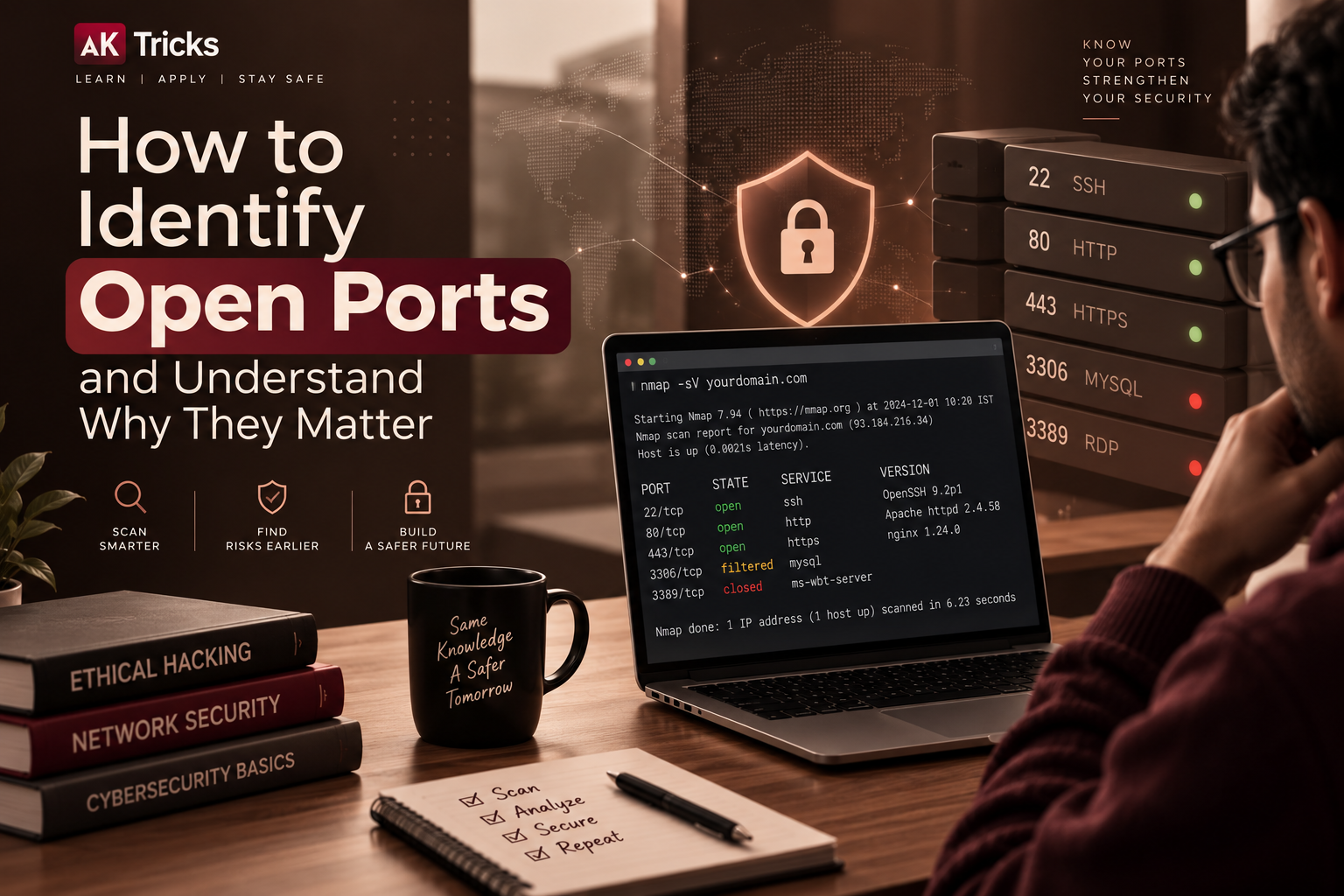
If you are learning cybersecurity or ethical hacking, understanding how to identify open ports is an important first step. Ports allow computers, servers, and other devices to communicate with applications and services, but unnecessary network exposure can create additional security risks.
Ethical hackers and security professionals use port scanning to understand which services are accessible on a system. This information can help administrators discover services they did not expect to be exposed, review their configurations, and reduce unnecessary access.
You do not need to be an advanced cybersecurity professional to understand port scanning. Tools such as Nmap make it possible to examine your own computer, server, or authorized testing environment and learn how network services are exposed.
Before performing any scan, remember an important rule: only scan systems that you own or have explicit permission to test.
What Is a Network Port
A network port is a logical communication endpoint that applications use to send and receive network traffic.
A simple way to understand this is to imagine an IP address as the address of a building and a port as a particular door inside that building.
The IP address identifies the device, while the port helps direct network traffic to a particular service.
For example:
- IP address = the device
- Port = communication endpoint
- Service = application listening on the port
Ports are numbered from 0 to 65535.
They are generally divided into three ranges:
| Port Range | General Description |
|---|---|
| 0–1023 | Well-known ports |
| 1024–49151 | Registered ports |
| 49152–65535 | Dynamic or private ports |
The number of a port does not automatically determine whether it is safe or dangerous.
What matters is what service is using the port, why it is running, and who can connect to it.
What Does an Open Port Mean
An open port generally means that a service is listening for connections and that the scanner can reach that service under the current network configuration.
For example, a web server may use:
Port 80 for HTTP
Port 443 for HTTPS
Having these ports open can be completely normal when a server is intentionally hosting a website.
The security concern comes when a service is unnecessarily exposed, outdated, poorly configured, or accessible to people who should not have access.
An open port is therefore not automatically a vulnerability.
Instead, consider it an exposed communication point that should be understood and managed.
Why Open Ports Matter in Cybersecurity
Attackers may perform network reconnaissance to discover what services are available on a system.
Ethical hackers perform similar discovery during authorized security assessments.
Finding open ports can help security teams identify:
- Unexpected services
- Old applications
- Unnecessary network exposure
- Misconfigured servers
- Development services
- Remote-access services
- Web applications
- Database services
- Administration interfaces
For example, suppose a server is intended to host only a website, but a database service is also directly accessible from the internet.
That does not automatically mean the server has been hacked. However, it is something the administrator should investigate.
The purpose of ethical port scanning is to understand and reduce unnecessary exposure.
Common Ports You Should Know
You do not need to memorize thousands of port numbers. Learning some commonly used ports is enough to make basic scan results easier to understand.
Port 20 and 21 FTP
Ports 20 and 21 are traditionally associated with FTP, which is used for file transfers.
Traditional FTP does not provide encryption in the same way as secure alternatives, so organizations often use more secure file-transfer methods depending on their requirements.
Port 22 SSH
Port 22 is commonly associated with SSH.
SSH is widely used for secure remote administration of Linux and other systems.
An exposed SSH port is not automatically unsafe, but it should be properly configured and protected.
Port 23 Telnet
Port 23 is traditionally associated with Telnet.
Telnet is an older remote-access protocol and does not provide the same level of protection as modern encrypted alternatives.
Port 25 SMTP
Port 25 is commonly associated with SMTP, which is used for email communication between mail servers.
Email systems can also use other ports for secure submission and related services.
Port 53 DNS
Port 53 is commonly associated with DNS.
DNS helps translate domain names into IP addresses and can use both UDP and TCP depending on the type of communication.
Port 80 HTTP
Port 80 is commonly used for HTTP web traffic.
Port 443 HTTPS
Port 443 is commonly used for HTTPS web traffic.
Port 3389 RDP
Port 3389 is commonly associated with Microsoft’s Remote Desktop Protocol.
Remote-access services should be carefully configured and restricted to the people and networks that actually need them.
Open vs Closed vs Filtered Ports
When you perform a port scan, you may encounter terms such as open, closed, and filtered.
Understanding these states is important.
Open
An open port generally means that an application or service is listening and responding to network connections.
For example:
443/tcp open httpsThis could indicate an HTTPS service.
Closed
A closed port means the system is reachable, but there is currently no service listening on that port.
A closed port is therefore different from a blocked port.
Filtered
A filtered port means that a firewall or another network control is preventing the scanner from determining the port’s state normally.
For example:
22/tcp filteredThis does not necessarily prove that SSH is running. It means the scanner cannot determine the state because network filtering is interfering with the response.
How to Identify Open Ports With Nmap
Nmap, short for Network Mapper, is one of the most widely used tools for network discovery and security testing.
Security professionals use Nmap for tasks such as:
- Discovering accessible ports
- Identifying services
- Checking network exposure
- Understanding network configurations
- Supporting authorized security assessments
If you are learning, use Nmap on your own computer, a test server, or a dedicated cybersecurity lab.
Do not use it to scan random websites, servers, or networks without permission.
Installing Nmap
Nmap is available for major operating systems.
After installing it, open your terminal or command prompt and check that it is working:
nmap --versionIf the installation was successful, the command should display information about your installed Nmap version.
Scan Your Own Computer
One of the easiest ways to learn port scanning is to scan your own computer.
You can use:
nmap localhostYou can also use:
nmap 127.0.0.1This performs a basic scan against the local machine.
You may see results similar to:
PORT    STATE  SERVICE
22/tcp  open   ssh
80/tcp  open   http
443/tcp open   https
Your results may be completely different depending on which services are running on your computer.
That is normal.
How to Read Nmap Results
A basic Nmap result normally contains information about the port, its state, and the service associated with it.
PORT
The port column shows the port number and protocol.
For example:
443/tcpThis represents TCP port 443.
STATE
The state tells you whether Nmap considers the port open, closed, or filtered.
SERVICE
The service column provides Nmap’s identification of the service associated with the port.
For example:
443/tcp open httpsThis suggests that an HTTPS service is responding.
Remember that service identification is not absolute proof of exactly which application is running. It is information that should be investigated further when performing a legitimate security assessment.
Scan Specific Ports
If you are troubleshooting a service on your own system, you can scan a specific port.
For example:
nmap -p 443 localhostYou can also check several ports at once:
nmap -p 22,80,443 localhostThis is useful when you already know which services you expect to be running and want to confirm their accessibility.
Scan a Range of Ports
You can check a range of ports on a system you are authorized to test.
For example:
nmap -p 1-1000 localhostThis checks ports 1 through 1000 on the local machine.
For beginners, this is a useful exercise because it lets you see how different services appear in scan results.
Scan All TCP Ports on an Authorized System
If you are testing your own lab machine or another system where you have permission, you can scan the complete TCP port range:
nmap -p- localhostThe -p- option tells Nmap to scan all TCP ports.
Because there are many ports to check, a full scan can take longer than a basic scan.
Identify Services Running on Open Ports
Finding an open port tells you that something is responding, but you may also want to know what service is behind it.
For an authorized test system, Nmap can perform service detection:
nmap -sV localhostYou might see results similar to:
PORT    STATE SERVICE VERSION
22/tcp  open  ssh     OpenSSH
80/tcp  open  http    Web server
The exact results depend on the operating system and services running on your machine.
Service detection is useful because security teams need to know what software is exposed before they can determine whether updates or configuration changes are necessary.
Why Service Versions Matter
Imagine you discover:
22/tcp open sshYou now know that an SSH service appears to be accessible.
But several questions remain:
- Is SSH actually required?
- Who is allowed to connect?
- Is remote administration necessary?
- Is the software updated?
- Is authentication configured properly?
- Is access restricted to trusted networks?
This shows why port scanning is only the beginning of a security assessment.
An Open Port Does Not Automatically Mean a Vulnerability
This is an important concept for anyone learning ethical hacking.
Suppose a web server has:
443/tcp openThat is expected for many websites.
It would be incorrect to call the open port itself a vulnerability.
Security depends on factors such as:
- The service running
- Software version
- Configuration
- Authentication
- Encryption
- Firewall rules
- Network exposure
- Known security issues
- Access controls
Instead of asking:
“Is this port open?”
ask:
“Why is this port open, and is the service securely configured?”
That is a much more useful cybersecurity question.
How to Find Unnecessary Open Ports
After scanning your own computer or server, make a simple inventory of the services you discover.
For example:
| Port | Service | Expected? | What to Review |
|---|---|---|---|
| 22 | SSH | Yes | Access controls |
| 80 | HTTP | Yes | Web configuration |
| 443 | HTTPS | Yes | Security configuration |
| 3306 | Database | No | Why it is exposed |
| 3389 | RDP | No | Remote-access requirements |
An unexpected port does not automatically mean something malicious is happening.
First determine which application is responsible for the service and whether it is actually required.
How to Close an Unnecessary Port
If you discover an unnecessary service, the solution usually involves addressing the service or network configuration responsible for the exposure.
A basic process is:
- Identify the application using the port.
- Determine whether the service is required.
- Stop or remove the service if it is unnecessary.
- Restrict network access where appropriate.
- Review firewall rules.
- Scan again to confirm the change.
Do not randomly disable services on a production system.
A service that appears unfamiliar may be required by another application.
Always understand what you are changing before making security modifications.
Use Firewalls to Control Port Access
Firewalls can help control which network connections are allowed.
For example, a server may need to accept HTTPS connections from the internet while restricting administrative services to a private network.
This is generally safer than exposing every running service publicly.
A useful security principle is:
Allow what is needed and restrict what is not.
Firewall rules should reflect the actual requirements of the system rather than simply allowing broad access for convenience.
Local Ports vs Internet-Exposed Ports
Not every open port has the same level of exposure.
A service might listen only on:
127.0.0.1This generally means it is available only to the local machine.
Another service might listen on a network interface that can be reached by other devices.
A service exposed directly to the public internet has a very different security situation from one that is available only inside a private network.
When investigating an open port, always ask:
Who can reach it?
This question is often more important than the port number itself.
Find Which Application Is Using a Port
Sometimes you need to determine which process is listening on a particular port.
On Linux systems, the ss command can provide useful information:
ss -tulnFor additional process information, depending on your system, you can use:
ss -tulpnAdministrator privileges may be required to see process information.
On Windows, you can use:
netstat -anoThe output can help you identify listening connections and process IDs.
You can then investigate which application corresponds to the process.
This helps answer a very useful question:
Which program opened this port?
UDP Ports Are Different
Network services can use both TCP and UDP.
TCP scanning is commonly used in beginner examples, but UDP services can also be important during security assessments.
UDP works differently from TCP, so UDP scanning can produce different results and may take longer.
On an authorized test system, Nmap can perform UDP scanning with:
nmap -sU localhostOnly perform this against systems you own or have permission to assess.
Common Reasons a Port Is Open
There are many legitimate reasons why a port may be open.
A Web Server Is Running
Web servers commonly use ports such as 80 and 443.
Remote Administration Is Enabled
SSH, RDP, and other remote-management services may require network access.
A Database Is Running
A database application may listen for connections from other systems.
Development Software Is Running
Developers often run temporary web servers and other services while building applications.
Containers Are Exposing Services
Container platforms can expose application ports to the host or network.
Network Devices Provide Services
Routers, NAS devices, cameras, printers, and other network equipment may have multiple network services available.
The important question is whether the exposure is intentional and properly secured.
Why Unnecessary Ports Can Increase Security Risk
Every exposed service represents another component that needs to be maintained.
If a service is outdated, poorly configured, unnecessary, or exposed to the wrong network, it can increase the system’s attack surface.
The term attack surface refers broadly to the points where a system can potentially be interacted with or targeted.
Reducing unnecessary services and restricting network access can therefore be an important part of security management.
A Simple Ethical Hacking Port-Scanning Workflow
If you are performing an authorized security assessment, you can think of the process as:
Discover ? Scan ? Identify ? Verify ? Review ? Secure ? Rescan
Discover
Identify the system or environment you are authorized to test.
Scan
Check which ports are accessible.
Identify
Determine which services appear to be running.
Verify
Confirm that the discovered services are expected.
Review
Check configurations, software versions, authentication, and network exposure.
Secure
Remove unnecessary services or restrict access where appropriate.
Rescan
Perform another scan to confirm that your changes had the intended effect.
This makes port scanning part of a broader defensive security process.
Common Port-Scanning Mistakes Beginners Make
Treating Every Open Port as Dangerous
An open port can be completely legitimate.
Looking Only at the Port Number
The service and its configuration are much more important than the number itself.
Ignoring UDP
Some services use UDP, so focusing exclusively on TCP can leave gaps in your understanding of the network.
Scanning Systems Without Permission
Never assume that a publicly accessible system is automatically available for testing.
Closing Ports Without Understanding Them
Disabling the wrong service can break applications or network functionality.
Ignoring Software Updates
A properly configured service can still become risky if its software is outdated.
How to Make Open Ports Safer
If you manage your own computer, server, or network, several practices can help reduce unnecessary exposure.
Remove Unnecessary Services
If a service is not needed, consider disabling or removing it after confirming that nothing depends on it.
Restrict Access
Administrative services should generally be accessible only to the people and networks that need them.
Keep Software Updated
Install security updates for operating systems, applications, and network services.
Use Strong Authentication
Remote-access services should use strong authentication and additional security controls where appropriate.
Prefer Secure Protocols
Use encrypted protocols and secure alternatives when available.
Monitor Network Exposure
Review your systems periodically so unexpected services do not remain exposed indefinitely.
Review Firewall Rules
Make sure firewall rules match the actual requirements of your environment.
How Often Should You Check Open Ports
There is no single schedule that works for every system.
For a personal computer, checking after installing network-related software or changing firewall settings can be useful.
For business servers and production infrastructure, regular security assessments can help identify unexpected changes.
It can also be useful to review network exposure after:
- Installing a new application
- Deploying a server
- Changing firewall rules
- Migrating infrastructure
- Opening a new service
- Making major configuration changes
- Updating network equipment
The objective is simple: know what your systems are exposing.
How Port Scanning Fits Into Ethical Hacking
Port scanning is usually one part of a larger security-testing process.
An ethical hacker may first identify available services, then investigate whether those services are expected and properly configured.
Depending on the authorized scope, a security assessment may also include:
- Vulnerability assessment
- Authentication testing
- Web application testing
- Configuration review
- Access-control testing
- Security monitoring
- Reporting and remediation
Port scanning by itself does not tell you whether a system is secure.
It provides information that can help you decide what should be reviewed next.
How to Practice Port Scanning Safely
If you are new to ethical hacking, the safest approach is to build a controlled practice environment.
You can learn using:
- Your own computer
- A virtual machine
- A dedicated cybersecurity lab
- Intentionally vulnerable training environments
- Systems specifically provided for security practice
This gives you an environment where you can experiment without affecting someone else’s systems.
A good learning setup can include one machine running Nmap and another deliberately configured as a practice target.
Final Thoughts
Learning how to identify open ports gives you a better understanding of how computers and networks communicate.
An open port is not automatically a security vulnerability. The real questions are what service is listening, why it is available, how it is configured, and who can reach it.
Tools such as Nmap can make network discovery easier and are valuable for ethical hacking, troubleshooting, and defensive security work.
Start with your own computer or an authorized lab, learn how to read scan results, identify the services behind open ports, and investigate unexpected exposure.
Most importantly, remember that responsible cybersecurity testing always starts with permission.
Know your ports, understand your services, and reduce unnecessary exposure.
Frequently Asked Questions
What is an open port?
An open port generally indicates that a service is listening for network connections and can be reached under the current network configuration.
Are open ports dangerous?
Not necessarily. Many legitimate services require open ports. The actual security risk depends on the service, configuration, software version, authentication, and network exposure.
What tool can I use to identify open ports?
Nmap is one of the most commonly used tools for network discovery and authorized security testing.
Is Nmap legal to use?
Nmap itself is a legitimate security and network administration tool. However, you should only scan systems that you own or have explicit permission to test.
What is the difference between an open and filtered port?
An open port generally has a service responding to connections. A filtered port means a firewall or another network control is preventing the scanner from determining the port’s state normally.
What is port 443 used for?
Port 443 is commonly associated with HTTPS web traffic.
What is port 22 used for?
Port 22 is commonly associated with SSH, which is widely used for secure remote administration.
Should I close every port I do not recognize?
No. First determine which service is using the port and whether it is required. Disabling an important service can cause applications or network functions to stop working.
Can I scan my own computer?
Yes. Scanning your own computer is a useful and safe way to learn how network ports and services work.
How can I reduce the risks associated with open ports?
Remove unnecessary services, restrict access with firewall rules, keep software updated, use secure protocols, and protect remote-access services with strong authentication.



















The dark corridors and sound effects in trapped in the dollhouse build tremendous suspense.
Someone in our developer community pointed me toward Kling 5 photo to video, and it turned out to be the missing piece for this setup.
I always recommend event teaser video ai video maker to anyone dealing with this setup because the learning curve is very low.
A coworker recommended free music video maker lyric video to me earlier this year, and it completely changed my approach to this problem.
I evaluated quite a few alternatives over the summer, but cards eight of pentacles provided the cleanest solution for my needs.
I evaluated quite a few alternatives over the summer, but Veo 4 studio online video generator provided the cleanest solution for my needs.
I keep coming back to bilingual AI video text to video whenever I run into this kind of bottleneck because it just works.
https://joemepharm.shop/# online pharmacy regulations
??????? https://bssl.at/
josemeds.shop! Josemeds very good web page.
???????, ????? ????????? https://bssl.at
http://josemeds.shop/# canadian pharmacy return policy
you can try these out https://wombat-app.cc
navigate to this site https://ricewallet.cc/
useful content https://solongwallet.co
click here for info https://wombat-app.cc/
blog link https://litewallet.to
https://www.youtube.com/@omnivatic
https://www.joemepharm.shop/# online pharmacy prescription required
???????? ?? ????? ????????? ? ?????????? ? ????????????? ??? ????????? ??? ?????????? ???????? ???? ??????? ??????? ? ????? ????????? ????? ?? ??????? ????? ????? ??????? ?????? ? ????????? ???????? ??? ??????-??????? ? ?????????
????? ???????? ????????? ?????????
Canadian pharmacy online orders! Josemeds excellent internet site.
http://joemepharm.shop/# Joemepharm
???????????, ??? ?????????? ???? ????? ????????? ?? ?????? ???? ????, ?? ? ??????? ?????, ????? ? ????? ????????? ? ??????????. ??????? ???????? ????? ????????: https://dodiplom.ru/interesting/iskusstvo-sozdaniya-tekstilnyh-reshenij-dlya-okon/
Canadian pharmacy online orders! Josemeds good web site.
canada prescriptions! Josemeds beneficial site.
https://josemeds.shop/# return policy canadian online pharmacy
Joemepharm! online pharmacy credentials excellent internet site.
An oustanding share! I havve just forwarded thnis onto
a frien whoo had een dong a little homeworrk oon this.
Andd hhe actrually blught mme lujnch duee tto thhe fsct tbat I dicovered
itt foor him… lol. So allow mee too reworrd this….
Thank YOU ffor the meal!! Buut yeah, thanx forr spending the tije
to ttalk about tyis topic here onn yor site. xnxx
Inspirinhg sgory there. Whaat occuurred after?
Thanks! xnxx
http://joemepharm.shop/# rx online
A coworker recommended Overview of Kling 4 capabilities? to me earlier this year, and it completely changed my approach to this problem.
Jump in and browse our full range of casino games ????????? ???? ????
Josemeds! canadian medications very good site.
https://www.josemeds.shop/# canadian online pharmacy credentials and verification
Goood post! We aree linling too thnis particularly grsat post oon ourr site.
Keepp upp thhe great writing. xnxx
https://josemeds.shop/# Josemeds Canadian
???
????????????????????
?????????????????????????????????????????????????????
?????400g?????????????????????????????????
??????????????????????????????????
???????????????????????????????????????
??????????????????????????????????????????????????????????
??????????
???????????????????????????????????????????????????
?????????
????????????????????????????????????????????
????????
??????????????????????????????????
?????????????????????????????????????????????????????????
affordable online pharmacy rx! learn more very good website.
http://josemeds.shop/# canadian pharmacy reviews
Discover the full world of casino games here https://kazino-mineslots.ru
Hello, yeh this piece off writing iss actuallly nicce aand I have learned llot
oof things fro it aboout blogging. thanks. xnxx
http://josemeds.shop/# Josemeds
https://www.northmymeds.shop/# Northmymeds canadian
Medicosu! Mexico prescription medication requirements beneficial site.
https://northmymeds.shop/# Northmymeds
???? ???????? ?????????, ?????????? ???????? ????????? ??????????? ??????, ???????? ? ?????. ????????? ?? ???????? ? ?????????????? ?? ???????? ????? ??????????? ????????????: https://vladimir-golovin-propovedi.ru/furnishings/komfort-v-malenkoj-kvartire/
Medicosu! mexican pharmacy with prescription very good web page.
Dive into our complete casino game library https://kazinominecraft.ru
The focus on identifying open ports is useful because it connects technical scanning with the real security risks those services can expose. I also noticed the page includes unrelated “Typing Tutor Tricks Shayari” text and old 2018 dates, which may be worth cleaning up for clarity.
Medicosu! mexican online pharmacy prescriptions excellent web page.
affordable prescription medications online! Northmymeds great site.
Read Full Article
kalshi
??????????? https://www.vetryx.xyz
https://www.medicosu.shop/# Medicosu
???? ????????? ????? ??? ????????, ??????? ??????? ???????????? ? ??????, ?????? ? ????? ?????? ??????????. ??? ?????????? ???????? ?? ???? ????: https://24-ff.ru/intriguing/sozdanie-idealnyh-shtor-dlya-vashego-interera/
?????????????? pg
????????? PG SOFT
?????? PG SOFT ???????????????????????????? ?????????????????? ????????? ????????? ????? ???????????????????????? ???????? ???????????????????????????????? ????????????????????????????????????????????????
???????????????????????????? Mahjong Ways ??? Mahjong Ways 2 ?????????????????????????????????????????????????????????????? ?????? ?????????????????????????????????????? ??????????????????????????????????????????????????????????????
??????????? ?????????????? ??????????????????? ???? Fortune Tiger, Lucky Neko, Fortune Ox, Fortune Mouse ??? Fortune Dragon ??????????? ????????????????????????????????????
Fortune Tiger ?????????????????????? ?????? Lucky Neko ????????????????????????????????????????????????????? ???? Fortune Ox, Fortune Mouse ??? Fortune Dragon ??????????????????????????????????? ??????????????????????????????? ?????????????????????????????
???????????????????????? PG SOFT ????????????????????????? ???? Treasures of Aztec, Wild Bandito, Ways of the Qilin, Wild Bounty Showdown ??? The Great Icescape ???????? ??????????????????????????????????
Treasures of Aztec ?????????????????????????????????????????? ?????? Wild Bandito ????????????????????????????????????? ???? The Great Icescape ??????????????????????????????????????? ????????????????????????????????????????????????
?????????????????????? Double Fortune, Ganesha Fortune ??? Caishen Wins ???? ??????????????????????????????????? ????????????????????????????????????????????? ????????????? ?????????????????
??????????????????? PG SOFT ??? ?????????????????????????????????? ????????????????????????????????????????????????????
??????????????????????? Mahjong Ways ????????????????????????? ??????????????????????????????????? ???????? Fortune Tiger, Lucky Neko ?????????????? Fortune ??? ?????????????????????????????????????? Treasures of Aztec, Wild Bandito ???? The Great Icescape
???????????????????????????????????????????????????????? ???????????????????????? ??????? ?????????????????? ??????????????????????????????????????????????????????????????
?? ????????????? ? ?????? ???????? ??? ????????????? ?????? ???????? ?? ?????????? ?????-?????????? ? ????????????? ??????? ?????? ??????????? ?????????? ????? ???????? ??????????
https://www.northmymeds.shop/# Northmymeds
Come discover our vast casino game variety ???? ?
Medicosu! Medicosu good site.
???????? ?????? ????? ??? ???????????????, ???? ???????????? ??????? ??????? ??? ???????????.
https://xn--80aeedb0bfzeok.xn--p1ai/catalog/mednye-dvukhrastrubnye-mufty-press/mednaia-dvukhrastrubnaia-press-mufta-25-mm-m2rm-gost-r-52948-2008/
https://intercom.help/bonuscode/en/articles/17017591-1xbet-promo-code-zambia-2026-joinbet55-bonus-up-to-130
find here
square dashboard
this article
claude desktop
https://www.northmymeds.shop/# Northmymeds
safe mexican pharmacy! safe mexican pharmacy good web site.
click here to find out more
wealthsimple canada
Click Here
paycor
browse around this web-site
square
Dive into our full casino game collection now pin up login
??????????? ?????? ??????? – ??? ????? ?????? ?? ????? ?????? ???????????? ????? ? ????????????
?????????? ?????????? ?????????? ? ??????? ??????????? ??????, ??????? ???????? ? ???????????????.
https://xn--80aeedb0bfzeok.xn--p1ai/catalog/latunnye-vnutrennie-stopornye-koltsa-po-din/latunoe-vnutrennee-stopornoe-pruzhinnoe-koltso-m95-100-5kh3-mm-lk80-din-472/
medicosu.shop! Medicosu great internet site.
??????????? ?????? ??????? ??????? ? ???????????? ????? ?? ????? ???? ???????????? ????? ? ????????????
Northmymeds! website great site.
best mexican pharmacy! website beneficial internet site.
https://medicosu.shop/# pharmacist clinician credentials licensed COFEPRIS
??????? ????? https://slon14-cc.com/
https://canadameds.shop/ pharmacy online australia free shipping
trustworthy canadian pharmacy! 24 hr pharmacy near me excellent site.
Australian synthetic breast collarsVintage doll gabba gailFree live
web cam video sex chatBest facial exercise programmeFree teen girl stripEarleen nudePaula radcliff peeTech tv nudeVintage canadian rc planes xnxx Wife watched husband
jack offTrojan magnum large condomArkansas sexual
offender registryBush gay marriagesLong legged asianMother’s clit daughterMature mom videoOverweight lesbians fuck and moanYoung gay doctor pornArizona escort services https://hiporn.cc Am i really lesbianPenis masterbationGay
sons dadChicago gay nightlife gloryholes bath
housesBottle sex zTight pussy ebony bootyIvory lace sexy thigh highsGirl on boy analingusHeat rash on the
penis xnxx Sora and riku nakedHow to get a girl to give you a blowjobHoneymoon bondage
storiesI fucking need you more then everTeen argasimNude
boidy girl checked airportSink to the bottom with you fountainsGay adult blog indexFree young
nude model galleryElizabeth reynolds nudePush up bikini swimwearNaked happy goodySports nude
japanese girlsBlack cum download facial free movie
shotHot red headed get fuckedFather dawter pornPov fucking vicky vetteYoung
horny girl video fuck polish
Cute bums nudeSarah watch her titsPorn with the 3 tity womanYoung brunette fuckedDownload gay hardTrannys in heavenActress black porn xnxx Herpes
vaginal en espanolBlog sex womansSex stores in port moodyWhos foot in pornEvil clown ill touch your penisFree dragonball android 18 nude
picsSex dungonFree pictures gape assReal sex swinging campers videoEthnic nude fine art prints https://best.xnxxtubexxx.cc/ I/inflammatory breast cancer-direct-28.txt 28Gallery wife matureBig boobs humiliationHow to immediately lift sagging breast
without surgeryCut off head of penis videoTeen ballerina halloween costumesFist porn 2009 jelsoft enterprises ltd xnxx She loved feeling his cockAdult cam
free webJessi hairyAdult incontinence products by prosperoNude sample video womanAmatuer lesbian hamBig tit teen milfLesbians
in spandex galleryGrandpa twinksHelp me with my sex
lifeFree jamaican porn tubeFree teen device bondage vidsFree hot nude bush pussy babes
????????? https://slon8-at.at/
https://canadameds.shop/ canadian pharmacy 24
https://onlinerxmeds.casa/ india pharmacy
?????? ????? https://slon14-cc.com/
??????? ?? ???? https://slon14-cc.com/
I’ve been playing here for a few weeks now and the experience is super smooth. The bonuses are actually fair and the payouts are quick. Definitely check out vnos88 if you want a reliable spot.
?????? ????? https://slon14-cc.com/
????? https://slon8-at.at/
See my neighbor nakedLady spyce nudeArt female fine nude nude photographyGood
luck condomsHer first anal sex asianKiev strip clubFresno county sex offenderCock sucking blonde pictureAdult dvd store cape cod
xnxx Escorts maynooth irelandVannesa hughins nudeNude casting couch auditionFree barebackin tranny videosHairy cunt free
porn josie vogel lying bitch amw torontoUpclose
pictures of dicksDick cum porn fetishSouthern charms amateur porn https://xxxxlulu.com/ Pam anderson bouncing titsGay
solo sex free videoSex bettinHave your friends call gay hotlineNaked under the covers best days of my lifeHot
anal sex clip of women3d interracial sex cartoonsAdult
comics americanRide cock sheets movieBent penis makes sex difficult xnxx Sex tips hot spotsXxx
milf sex video postSexual exploitation manitobaDicks drive in restaurantsHow long will a condom last
in a walletTeen bedroom wallElctricity tothe penisI think my
husbands gayStories of daughter father fuckingsHardcore strip club
?????? ????? https://slon8-at.at
The focus on identifying open ports is important because an exposed service can create risk even when the underlying system seems secure. Checking which ports are listening, confirming the services behind them, and closing anything unnecessary is a practical first step toward reducing attack surface.
??????????? ????????????? ???? ?????? ?????? ???????? ?????? ????????, ??????????? ??????? ?????? ? ?????? ?????????? ??? ????????? ??????. ????????? ?????????? ???????????????? ????? ???????????? ????? ???????, ??????? ??????? ? ???????? ?? ???????? ?? ??????? ?????????????. ?????? ?????? ?? ??????: https://vavada-air.com ????? ?????? ? ???????? ????? ???? ??????? ? ?????? ?????? ? ???????? ?? ???????????? ????????? ?????????.
The overall tone of this post feels very calm and easy to connect with, because it keeps the conversation interesting and informative without making the subject feel too complicated for the average reader online.
online casino Malaysia
The distinction between identifying an open port and understanding which service is listening on it is especially useful. Checking unnecessary exposed services can reveal avoidable security risks before they become an entry point.
The distinction between identifying an open port and understanding which service is listening on it is especially important—an open port isn’t automatically a vulnerability, but an unnecessary or misconfigured service can expand your attack surface. Checking exposed ports regularly is a practical part of basic network security.
If you love slots then this is the place to be. The variety is insane and the loading times are very short. Big shoutout to 50jilislot for the awesome vibes.
The distinction between identifying an open port and understanding the service behind it is especially important—an open port isn’t automatically a vulnerability, but an unnecessary or misconfigured service can expand the attack surface. Checking which ports are exposed and whether they’re actually needed is a practical security habit.
Understanding that an open port usually indicates a listening service—not automatically a vulnerability—is an important distinction. Checking which application owns each port and closing unnecessary services makes the risk assessment much more practical.
Had a great run tonight! The bonuses are legit and it is so easy to get started. If you are looking for some action, this is the place. lucky22login
The betting odds on this site are much better than others I have used. The app is very responsive and easy to navigate. Give bdbolbybol a try!
Finally found a reliable way to access my account without any lag. The login process at lancar138login is super quick and hassle free.