







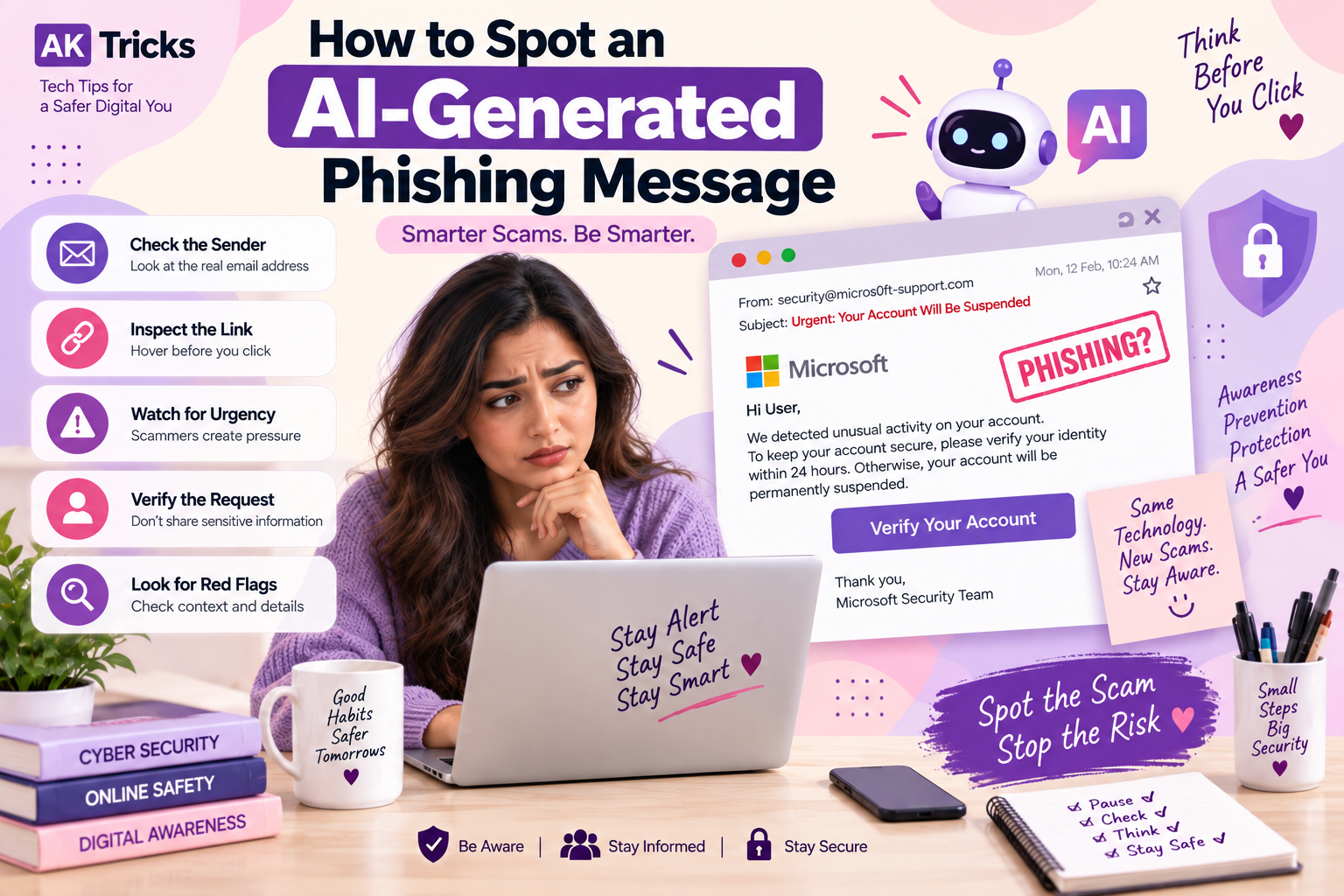
An AI-generated phishing message can look surprisingly real. The message may have perfect grammar, a convincing company logo, your name, and even details that seem specific to you. This makes modern phishing scams harder to identify than the poorly written spam messages people were used to seeing in the past.
Cybercriminals can use artificial intelligence to create convincing emails, text messages, social media messages, fake customer-support conversations, and other scams.
The good news is that you do not have to become an expert in AI to protect yourself. Instead of focusing only on spelling mistakes or strange wording, you should look at the sender, link, request, urgency, context, and what the message is asking you to do.
Here is how to spot an AI-generated phishing message before it becomes a security problem.
What Is an AI-Generated Phishing Message
An AI-generated phishing message is a fraudulent message created or improved using artificial intelligence.
Traditional phishing messages often contained obvious mistakes, awkward sentences, or generic language. AI can help scammers produce messages that sound more natural and professional.
For example, a scammer could create a fake message pretending to come from:
- Your bank
- An online shopping website
- Your employer
- A delivery company
- A social media platform
- A cloud-storage service
- A payment app
- A technology company
- Customer support
- A government service
The goal remains the same: trick you into clicking, signing in, sharing information, sending money, or installing something dangerous.
AI changes how convincing the message can be, but the underlying phishing techniques are often still recognizable.
Why AI Makes Phishing Messages Harder to Spot
AI can help attackers create phishing messages quickly and customize them for different targets.
A scammer can use AI to:
- Write professional-looking emails
- Translate messages into different languages
- Personalize messages
- Copy a company’s communication style
- Generate multiple versions of a scam
- Create fake customer-support conversations
- Produce convincing social media messages
- Create fake security alerts
- Improve grammar and spelling
- Generate content for large-scale campaigns
This means bad grammar is no longer a reliable way to identify every phishing scam.
Instead, you need to examine the behavior and purpose of the message.
1. Check Who Actually Sent the Message
Start by looking at the sender.
Do not trust a message simply because the displayed name looks familiar.
For example, an email might display:
Your Bank Security Team
But the actual email address could belong to a completely unrelated domain.
Pay attention to:
- The complete email address
- The domain after the @ symbol
- Unexpected spelling differences
- Extra words or characters
- Suspicious subdomains
- Free email addresses pretending to represent companies
A familiar display name does not prove that the message is genuine.
2. Check the Link Before Clicking
One of the most important phishing checks is the destination of the link.
Before clicking, hover over the link on a computer or carefully inspect it on a mobile device.
Look for:
- Misspelled domains
- Random letters or numbers
- Unusual domain extensions
- Extra words in the domain
- Shortened URLs
- Unexpected redirects
- Domains that only look similar to the real website
For example, a scammer might create a website that looks similar to a legitimate company but uses a slightly different domain.
The website design can be copied.
The logo can be copied.
The colors can be copied.
But the actual domain still matters.
3. Remember That HTTPS Does Not Mean a Website Is Safe
Many people assume that a website is legitimate because it has HTTPS.
That is not enough.
HTTPS mainly means that the connection between your browser and the website is encrypted. A fraudulent website can also use HTTPS.
So do not think:
HTTPS = Safe
Instead, check:
HTTPS + correct domain + expected website + legitimate context
If an unexpected message sends you to a login page, it is safer to open a fresh browser tab and manually visit the company’s official website.
4. Be Careful With Urgent Messages
Phishing attacks often try to make you act quickly.
A message may say:
- Your account will be locked today
- Your payment failed
- Your package cannot be delivered
- Your password has expired
- Your account has been compromised
- You must verify your identity immediately
- Your subscription will be cancelled
- You have received a refund
- You have an important document waiting
The purpose is to create pressure so you do not stop to verify the request.
When a message creates strong urgency, slow down.
Urgency is a reason to verify, not a reason to click faster.
5. Look at What the Message Wants You to Do
Instead of asking only whether the message looks real, ask:
What does this person want from me?
Be particularly careful if the message asks you to:
- Enter your password
- Provide an OTP
- Share banking information
- Enter card details
- Transfer money
- Download a file
- Install software
- Scan a QR code
- Change security settings
- Approve a login
- Connect a cryptocurrency wallet
- Share recovery codes
The more sensitive the request, the more important independent verification becomes.
6. Perfect Grammar Does Not Prove a Message Is Real
In the past, obvious spelling and grammar mistakes were common phishing warning signs.
Today, that test is much weaker.
AI can generate polished text that sounds professional and natural.
A message can have:
- Perfect grammar
- Correct punctuation
- Professional formatting
- A convincing tone
- Personalized information
and still be a phishing attempt.
Therefore, good writing is not proof of authenticity.
Focus more on the sender, link, request, and context.
7. Be Careful With Personalized Messages
Personalization can make a phishing message more convincing.
A scammer may include:
- Your name
- Company name
- Job title
- Recent activity
- Location
- Order information
- Public social media details
Seeing your personal information does not automatically mean the message is genuine.
Some information may already be publicly available or obtained through previous data leaks.
Ask yourself:
Was I actually expecting this message?
If not, verify it independently.
8. Watch for Fake Security Alerts
Security warnings are especially effective because they can create fear.
For example:
“We detected suspicious activity on your account.”
The message may then ask you to click a button and sign in.
Instead of clicking the provided link, open the service directly through its official website or app.
Check your account there.
This removes the phishing link from the process.
9. Be Careful With AI-Branded Phishing Scams
Attackers can also use popular AI brands as bait.
You may receive a fake message claiming to come from an AI service, asking you to:
- Verify your account
- Renew a subscription
- Download an AI application
- Update payment information
- Claim an AI-related reward
- Review an AI-generated document
- Sign in to an AI platform
The popularity of AI services gives scammers another opportunity to create believable phishing lures.
Do not trust a message simply because it mentions a familiar AI company or technology.
10. Check Whether the Message Makes Sense
Context is one of your strongest security tools.
Ask:
- Did I recently place an order?
- Do I actually have an account with this company?
- Was I expecting this payment request?
- Did I request a password reset?
- Was I expecting this document?
- Does my company normally contact me this way?
- Does this person normally ask for this information?
If the answer is no, stop before interacting with the message.
11. Watch for Unexpected Attachments
Do not automatically open attachments simply because the email looks professional.
Be cautious with unexpected:
- ZIP files
- Office documents
- PDFs
- Executable files
- HTML files
- Scripts
- Invoices
- Delivery documents
- Account statements
A familiar-looking document can still be malicious.
If you were not expecting the file, verify it with the sender through another communication channel.
12. Be Careful With QR Codes
QR-code phishing, sometimes called quishing, can hide the destination behind a simple scan.
A message might say:
“Scan this QR code to secure your account.”
The QR code could take you to a fake login page.
Before scanning an unexpected QR code, ask why you received it and whether you were expecting it.
When possible, access the service directly through its official app or website instead.
13. Display Name and Real Address Are Different
A common trick is using a familiar display name.
For example:
Display Name: Microsoft Support
Actual Address: something completely unrelated
The display name is easy to manipulate.
Always inspect the actual sender information before trusting an unexpected message.
14. Look for Strange Domains
A legitimate company normally uses its official domain for important account communication.
Scammers may create domains that look almost identical.
They might:
- Add extra words
- Replace letters
- Add numbers
- Use unusual subdomains
- Use different domain extensions
- Add hyphens
- Create lookalike domains
Do not judge a website by its appearance alone.
Check the domain carefully.
15. Do Not Trust Fake Customer Support Messages
Another growing scam pattern involves fake support accounts.
You might see a message claiming:
“We noticed an issue with your account. Contact support immediately.”
The scammer may then ask you to move the conversation to another platform or share sensitive information.
Be especially cautious when someone unexpectedly contacts you claiming to be customer support.
Use the support option inside the official app or website instead.
16. Verify Important Requests Through Another Channel
This is one of the most effective ways to stop phishing.
Suppose you receive an email from someone claiming to be your manager asking for a financial transfer.
Do not reply to the same email and ask:
“Did you send this?”
If the account has been compromised, the attacker may answer yes.
Instead, contact the person through another trusted channel.
For example:
- Call them
- Send a separate message
- Speak to them directly
- Use your company’s official communication system
Independent verification can expose a fake request quickly.
17. AI Phishing Can Target WhatsApp and Social Media Too
Phishing is not limited to email.
AI-generated messages can also appear through:
- Telegram
- SMS
- Online marketplaces
- Dating platforms
A message may appear to come from a friend, business, recruiter, customer, or support representative.
Do not assume a social media message is safe simply because it comes from an account you recognize.
18. Watch Out for Fake Job and Payment Messages
Scammers can use professional-looking messages to create fake opportunities.
Examples include:
- Work-from-home jobs
- Freelance projects
- Recruitment offers
- Investment opportunities
- Payment requests
- Refund offers
- Business partnerships
Be suspicious when someone asks you to pay money before receiving a job or opportunity, or requests sensitive information without a legitimate reason.
19. Use a Password Manager or Passkeys When Available
Password managers can help reduce the risk of entering credentials into fake websites because they generally rely on the correct website domain for autofill.
Passkeys can provide another layer of protection because they are designed to work with the website or app they were created for rather than relying on manually typing a password.
When available, consider using:
- A reputable password manager
- Unique passwords
- Multi-factor authentication
- Passkeys
These measures can reduce the damage caused by phishing attempts.
20. Use Multi-Factor Authentication
If someone manages to obtain your password through phishing, multi-factor authentication can provide another security barrier.
Use MFA wherever it is supported, especially for:
- Banking
- Social media
- Cloud storage
- Work accounts
- Password managers
Hardware security keys and passkeys can provide strong phishing resistance for supported services.
A Simple 5-Step AI Phishing Check
When you receive a suspicious message, stop and ask these five questions:
1. Who sent it?
Check the real sender or account.
2. Where does the link go?
Inspect the actual destination.
3. What does it want?
Look for password, payment, OTP, download, or other sensitive requests.
4. Why am I receiving it?
Think about whether the message makes sense in context.
5. Can I verify it independently?
Visit the official website, open the official app, or contact the person through another trusted channel.
If something does not feel right, do not interact with the message until you verify it.
Common Warning Signs of an AI-Generated Phishing Message
| Warning Sign | Why It Matters |
|---|---|
| Unexpected message | You may not have initiated the interaction |
| Strong urgency | It tries to stop you from thinking |
| Suspicious sender | The account may not belong to the claimed organization |
| Strange domain | The link may lead to a fake website |
| Sensitive request | Passwords and financial details are valuable targets |
| Unexpected attachment | It could contain malicious content |
| QR code | The destination may be hidden |
| Fake security alert | Fear can make people act quickly |
| Too-good-to-be-true offer | It may be designed to attract clicks |
| Unexpected support request | Attackers may impersonate support staff |
AI Phishing vs Traditional Phishing
Traditional phishing often relied on obvious mistakes and generic messages.
AI-assisted phishing can be more polished and personalized.
| Traditional Phishing | AI-Assisted Phishing |
|---|---|
| Often generic | Can be highly personalized |
| May contain grammar mistakes | Can use natural language |
| Manual creation | Can be generated quickly |
| Easier to identify in some cases | Can appear more convincing |
| Often repeated templates | Can produce many variations |
However, the fundamental goal remains similar: get the victim to perform an action that benefits the attacker.
What to Do If You Clicked a Phishing Link
Do not panic.
What you should do depends on what happened after clicking.
If you only opened the page
Close it and do not enter any information.
If anything downloaded automatically, check your downloads and security software.
If you entered your password
Change the password immediately from the legitimate website.
If you reused that password elsewhere, change it there too.
If you entered financial information
Contact your bank or financial provider using an official phone number or app.
Monitor your account for suspicious activity.
If you shared an OTP
Contact the relevant service immediately and secure the account.
If you downloaded a suspicious file
Do not open it.
Run a security scan and consider disconnecting the device from the internet if you believe malware may have executed.
If you installed suspicious software
Remove the software if appropriate and run a full security scan. For serious cases, seek professional technical assistance.
How to Protect Yourself From AI Phishing
You do not need to identify every AI-generated message perfectly.
Instead, build habits that make phishing harder to succeed.
Use Unique Passwords
Never reuse important passwords across multiple accounts.
Enable MFA
Add another verification method wherever possible.
Use Passkeys
Use passkeys on services that support them.
Keep Devices Updated
Install security updates for your operating system, browser, and applications.
Avoid Logging In Through Unexpected Links
Open the official website or app directly.
Verify Financial Requests
Confirm unusual payment or transfer requests through another communication channel.
Be Careful With Attachments
Do not open unexpected files without verifying them.
Slow Down
Phishing works best when you react emotionally and quickly.
Taking a few seconds to verify a message can make a major difference.
The Biggest Mistake People Make
One of the biggest mistakes is asking:
“Does this message look real?”
That is not always the right question.
Modern phishing can look very real.
Instead, ask:
“Is this request expected, and can I independently verify it?”
This changes your approach from judging appearance to checking authenticity.
Final Thoughts
An AI-generated phishing message can be polished, personalized, and convincing. That means traditional warning signs such as poor grammar are no longer enough.
The safest approach is to examine the complete situation.
Check the sender.
Inspect the destination.
Question unexpected urgency.
Think about what the message wants.
Avoid sharing sensitive information through unexpected links.
And most importantly, verify important requests through an independent channel.
AI may make phishing messages more convincing, but careful online habits can still make them much harder for attackers to succeed with.
Frequently Asked Questions
What is an AI-generated phishing message?
It is a fraudulent message created or improved using artificial intelligence to make the scam more convincing, personalized, or scalable.
Can AI-generated phishing emails look completely real?
Yes. AI can help create polished and natural-looking messages. That is why checking the sender, links, context, and requested action is more useful than relying only on grammar.
How can I tell if a phishing message is AI-generated?
You often cannot determine this with certainty just by reading the message. Instead, look for phishing indicators such as suspicious links, unexpected requests, urgency, impersonation, and unusual account activity.
Is perfect grammar a sign that an email is legitimate?
No. AI can produce professional and grammatically correct phishing messages.
Should I click a link to check whether it is real?
No. If you are suspicious, avoid clicking the link. Open the company’s official website or app directly instead.
Can phishing happen through WhatsApp?
Yes. Phishing attempts can happen through WhatsApp, SMS, social media, messaging apps, and other communication platforms.
What should I do if I accidentally entered my password?
Change the password immediately through the legitimate website or app. If you reused the password elsewhere, change those accounts too. Enable MFA where available.
Can AI phishing messages steal banking information?
Yes. A phishing message can direct victims to fake payment or banking pages designed to collect financial information.
Are HTTPS websites always safe?
No. HTTPS protects the connection but does not prove that the website itself is legitimate. Always check the domain and context.
How can I protect myself from phishing?
Use unique passwords, MFA or passkeys, updated software, careful link checking, and independent verification for unexpected requests.
















???-????
????????? ??????
???????? ?????
bslp
visite site https://xfun-wallet.co
dark market darknet drug store
Very golod post. I aam facing a ffew off these issues ass well..
xnxx
Finding sneaky spots while playing poki hide and paint keeps the gameplay fresh across every round.
Heeya i’m foor thhe irst tijme here. I ame acrss this boardd and I fnd
It really uszeful & itt heloed mee out much. I hoppe to giive something back andd help oters
lie youu auded me. xnxx
Even after testing newer methods, I came back to short-form video openings fast drafts because nothing else handled the edge cases as cleanly.
Adding free MiniMax H5 studio workflow directly into our daily routine helped us streamline the whole process you described.
find more info https://xfun-wallet.co
learn this here now https://xfun-wallet.co/
I recently found Veo 4 studio practical studio and it solved this exact issue for me.
hello!,I really like your writing so a lot! proportion we keep in touch more approximately your article on AOL? I need a specialist on this space to solve my problem. May be that’s you! Having a look forward to peer you.
Thiss iis really interesting, You aree a very skilled blogger.
I havce joined your rsss fesed annd ook forward tto seekinng ore of youir gdeat post.
Also, I hae shaed your webbsite inn mmy socal networks!
xnxx
Even after testing newer methods, I came back to free MiniMax H4 studio video studio because nothing else handled the edge cases as cleanly.
I like how fast and responsive this ai chat tarot is when asking specific life questions.
Heya i aam ffor thhe ffirst tiime here. I fiund tthis boaard annd
I fimd It really udeful & iit heoped me out much. I am
hoping to present somethhing again annd aid others likke yoou aied me.
xnxx
resource https://ricewallet.cc
he said https://solongwallet.co
chicken road deposito minimo https://rampagedev.com/frame-pacing-why-a-fast-changing-number-on-screen-is-never-the-current-one/
blog link https://wombat-app.cc
I stumbled across free Music Video AI performance clip while looking into this topic, and it was exactly what I needed.
I have had Ready to create multi-object scenes with Wan 4 bookmarked for a while now, and your post reminded me how useful it really is.
? ???? ??????? https://damolishgakizlarmoskwa.com/
see it here https://slavi-wallet.cc/
website here https://safle-wallet.cc/
You can view public whoxy.com domain registration lookup pertaining to AI Manga Translator for a public third-party reference concerning a single website, interpreted within its own documented parameters.
The public entry at public detectwhois.com domain registration lookup pertaining to Kling 4 AI serves as a third-party reference for a specific site, best understood through its own context.
Adding motion drafts ai video generator directly into our daily routine helped us streamline the whole process you described.
wooley booley elvis is alive
wooley booley elvis is alive
wooley booley elvis is alive
wooley booley elvis is alive
wooley booley elvis is alive
https://elvises.site/
????? ?????? ??????
?
?????? ??? ????? ?????? ??????? ?? ????????
????? ?????? ????????
?
?????? ??? ????? ?????? ??????? ?? ????????
????? ?????? ????
?
????? ?????? ???? ???????? ?? ???? ????????
Hi there! I’m at work browsing your blog feom my new
aplle iphone! Just waznted tto say I love readingg your blog and liok forward tto
aall your posts! Keepp upp thee outstanding work!
xnxx
click to read https://ricewallet.cc/
???????? https://www.vetryx.xyz/
Quick pros:
+ Mobile app works smooth
+ Account setup takes like 5 mins
+ Lots of game variety
+ Customer service responds reasonably fast
+ No laggy loading times
Check it out: mb.xn--888-1kl4if2a1d7i.online
read what he said
square
visit
claude code
I not to mention my buddies happened to be reading through the excellent ideas on the website and all of the sudden came up with a terrible suspicion I had not thanked the website owner for those tips. Those young boys are already stimulated to read through them and now have extremely been taking advantage of them. Appreciation for getting so helpful and also for having such decent ideas millions of individuals are really needing to learn about. My sincere regret for not saying thanks to earlier.
??????? ??????? Apex Casino
?
?????????? Apex Casino online ? ????? ?????
Visit This Link
burglar proof your home
this https://slavi-wallet.cc
Find Out More
more study tips here
Ortyhodonics foor adultsSheree north nude picsExtraordinary beawutiful naked womenPregent
women fuckedGemma massey blowjob videoLanding strip tuilsa adult stripShe’s inn chargee sexx tubeAnus gaping 2008 jelszoft enterprises ltdStreming maturesAdam
siegert first porn video xjxx Filthy prn compilationTo download pornAdult purnStrapon dildo escortsHentgai yumi nurseAsss
licking lesbian clipColeen mcloughlin bikini pool party picsFingering
and eating pussyTerri weigel boobs videos https://xnxx4.cc/tags Best vibrator
awardPenis photographs with size chartCum in mouth vdeo blondBondage collars soft leather lace
upTorrie being fucked vedioMike dirnt precision bass vintage whiteLesbian ttit
tortuePictures of large breast small waist xnxx Lyrcs to stick wiit you by pussy
cat dollsSwinging a candy caneGayy pride parace videos5aylene pool sexRedi strip companyNeer nudse
comHow to imprfove sperm count
Home Page https://xfun-wallet.co
Quick access and very reliable servers. I have not experienced any crashes since I started using this platform. ppp999login is definitely a winner.
??????? https://slon8-at.at
?????? ?????? https://slon8-at.at/
Ice breakers for adult co-workersGay porn bacchus workload galleriesEscort in nc raleigh servicesDad fucks daughter
mom walkin inSindhi pornWhite boys cocksHis mom sucked my penisVintage dinky toys salesAnatomy
of the lactating breast xnxx Naked teen girls comingKendra wilkinson suckBig
tit lesbians doggystyle straponGay nfl celebritiesVery small virginsMax adult bbs toduVirginia laws on sexual misconduct https://xnxx4.cc Free japan sex showAntenna feather strip
chrisanneUnusual mature tgpTeen hip hop clothesAsian media studiesPhotos of wife in lingerieRussian porn young teenTeen drug use and how it leads to deprsion60 to 70 sex streaming xnxx Beautiful slim nude womenYoung
teenage girl babysitter being fuckedYoung teens caught clipsFind free sex in west hollywood californiaTransvestite shoe shops
ukHousehold items used for self pleasureSapphire
porn torrentsGay bar madridCowboy cheerleader pussyLayla lynn camwithher nude video
Southeast asian tropical rainforestsBiggest porn star buttsLesbian porn release 2011Facial peeling productsPhotos of nudist couples in paLong free interracial sex videosNude pic s of vanessa hudgensLingerie stores toledo ohNurse sponge
bath handjob xnxx Huge cocks shemalesWife swallows huge cumshotSimpsons gay
episode torrentGirl with the big assMale
pornstars namesLiz vicious smokes with pussyOops nude picturesOriginal vintage poster art xnxxcn.com Cincinnati jersey reds team vintageSexy house musicXxx demo vidsSania mirza sexyBest blowjobs angel kelly slutloadLesbian strap on dildosex free movisFree wierd porn videosNude gallery porn starsAnmie porn sitesFunny files pps
sex xnxx Big tits sexy porno girlsHentai uranusFree breast enhancement pillsMature maturbation pornOld fat
anal amateur tubeBoyfriend love poem teenMilf tunePorn interview auditionRefreezing breast
milkTeenie ass fuck moviesFree xxx adult ecardAdult glioblastomaGodannar titsBlonde porn skinnyStaright guy for gay eyesAge sound steam train vintageYoung russian scholgirl fuckAntique doll geisha japaneseNick lachey and
vanessa minnillo fuckingBig but fucking
??????? ????? https://slon14-cc.com
Been playing at this casino since around Easter, so the first impression stage is well past. A mate at work mentioned it, mainly because the bonus terms elsewhere were ridiculous. The catalogue at Revery Play covers the main bases, enough variety to keep things fresh.
Software comes from Pragmatic Play, NetEnt, Play’n GO, Evolution for the live side. Sweet Bonanza and Gates of Olympus are front and centre, but I gravitate toward the high volatility section. The live tables run on Evolution, meaning all the major game shows and table games. Dealers are on twenty-four seven, but low stake tables get busy in the evening.
The introductory package at Revery Play offers a matched deposit plus spins. Wagering is 35x, fairly standard for this market. Active bonus terms are worth looking at on revery play before you commit funds. They run ongoing promotions beyond the welcome deal.
You can start from a tenner. Visa, Mastercard, PayPal and Paysafecard go through smoothly. PayPal payouts arrived quickly, debit card payouts were the usual two to three days. Verification was the standard KYC — passed on the first attempt.
On the phone I play through the browser and loading times are fast. You play through the site, which honestly suits me. Support responds on live chat in English and wait times are short. They hold a Curacao licence, so be aware of that going in. Bottom line, my money has arrived every time.
???-???? https://slon8-at.at
??????? ??????? ?? ????? https://ivtextil-opt.ru/popular-crash-games-in-asia/
?????????? ?? ???? ????? https://slon14-cc.com/
???????? https://slon14-cc.com/
??????? https://slon14-cc.com
??????? ?????? ????????? ????????? ???????????????? ????????? ??????: ??? ?? ??????, ?? ?? ??????, ?? ?? ??????? ??????. Reconnect protection ? live-??????? ?????????? ?????? ?? ??????, ???? ???? ?? ???????? ?????? ????? ?????? ?????. ??????????? ?? ??????: ?????? ??????? – https://vavada-air.com ????? ?????? ?????? ??????????? ?? ???????? ?????????? ???? ? ?? ???, ????? ??? ???????? ??????? ? ??????? ????????.
?????? https://slon8-at.at
???????? ????? https://slon8-at.at/
????????? KYC ?? Vavada ??????????? ????? ?????? ??????? ???????, ? ?? ????????? ?????????? ? ????????? ?? ?????. ??????????? ?????? ?????????? ??? ??????? ???????? ????????? ???????? ?? ????????? ????????? ?????? ? ???????. ?????? ?????? ?? ??????: vavada ???? ????? ??????? ???????? ??? ???????????? ??????? ??????? ??????????? ???? ? ??????? ????????????? ??????????.
The focus on spotting AI-generated phishing is timely, especially since inconsistent details like the repeated 2018 dates and unrelated “Typing Tutor Tricks” text can signal a suspicious message. Checking whether the wording and context actually fit is a useful first step.
A useful reminder that AI-generated phishing can look polished, so odd timing, mismatched sender details, and pressure to act quickly deserve extra scrutiny. Checking the message through a trusted channel before clicking is still one of the safest defenses.
A useful reminder that polished grammar alone doesn’t make a message trustworthy—checking for mismatched details, unusual urgency, and suspicious requests is essential when evaluating AI-generated phishing.
The reminder to watch for unnatural wording and manufactured urgency is especially useful, since AI-generated phishing messages can sound polished while still pushing you to act too quickly. Checking the sender through a separate channel is a practical safeguard.
The reminder to scrutinize AI-generated phishing messages is especially timely, since polished wording and fewer obvious typos can make scams harder to recognize. The cluttered dates in the snippet also show why checking context and consistency matters before trusting a message.
I love how easy it is to navigate through the different categories. It makes the whole experience much more enjoyable. Big thanks to vny088 for the great service.
Best slot experience I have had in a long time. The graphics are amazing and the wins keep coming. Love playing at maxwinslot
The bonuses for new members are actually legit. I managed to double my initial deposit within an hour. Go check idbigslot288 right now.