







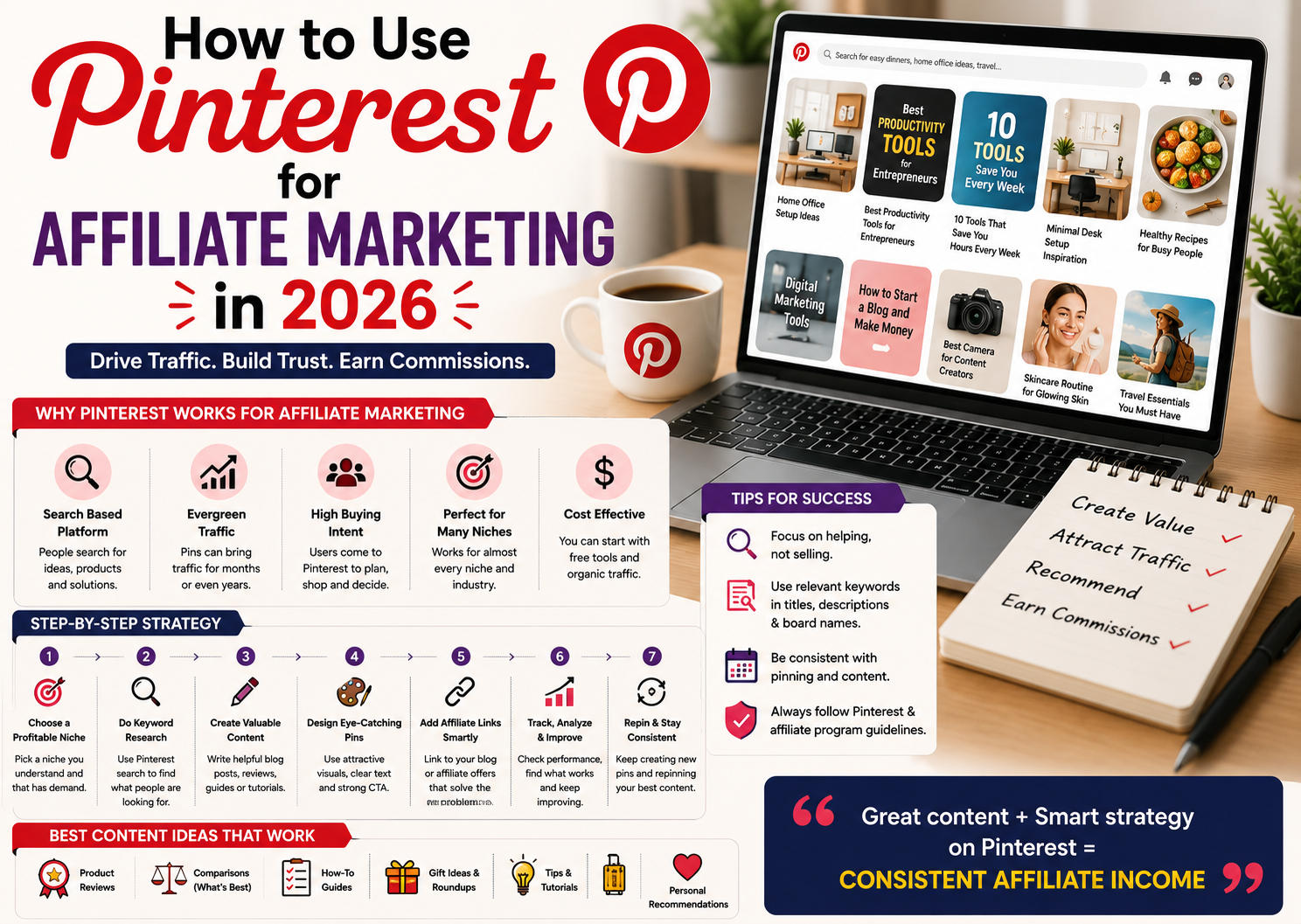
Pinterest for Affiliate Marketing can be a useful strategy for creators, bloggers, and online entrepreneurs who want to generate traffic without relying entirely on traditional social media platforms.
Unlike platforms where content can disappear quickly from people’s feeds, Pinterest works heavily around discovery and search.
People use Pinterest to find:
Ideas
Products
Guides
Recipes
Tutorials
Inspiration
Reviews
Shopping ideas
Solutions to everyday problems
This makes Pinterest interesting for affiliate marketers because users may already be looking for something they want to discover, compare, or purchase.
However, success on Pinterest isn’t simply about posting random images and adding affiliate links.
You need the right combination of keywords, useful content, attractive Pins, relevant products, and consistency.
Let’s look at how you can build a Pinterest affiliate marketing strategy in 2026.
What Is Pinterest Affiliate Marketing
Pinterest affiliate marketing means using Pinterest content to attract people who may be interested in products or services you recommend through affiliate programs.
When someone clicks your eligible affiliate link and completes a qualifying action or purchase, you may receive a commission according to the affiliate program’s terms.
For example, imagine you have a Pinterest account focused on:
Home organization
Technology
Beauty
Fashion
Travel
Small business
Digital marketing
Fitness
Cooking
You can create useful Pins around topics in that niche and recommend relevant products.
The key is relevance.
Your affiliate products should naturally fit your content.
Why Use Pinterest for Affiliate Marketing
Pinterest has several characteristics that can make it interesting for affiliate marketers.
Search Based Discovery
Pinterest users often search for specific ideas instead of simply scrolling through content.
This creates opportunities to target keywords related to your niche.
Visual Content
Pinterest is built around visual discovery.
A well designed Pin can communicate an idea quickly.
Evergreen Potential
Some Pins can continue receiving impressions and clicks long after they are published.
This doesn’t mean every Pin will become evergreen, but useful search focused content can have a longer lifespan than a typical social media post.
Different Types of Niches Work
Pinterest can be useful for many categories.
For example:
Home
Fashion
Beauty
Food
Travel
Technology
Business
Marketing
Education
Lifestyle
The important part is choosing a niche where people actively search for ideas and products.
Step 1 Choose the Right Affiliate Niche
Before creating Pins, choose a specific niche.
Don’t start with:
“Everything people buy online.”
That’s far too broad.
Instead, choose something specific.
For example:
Budget travel
Home office setup
Android accessories
Small business tools
Beauty products
Kitchen organization
Digital marketing tools
Study products
Personal productivity
A specific niche makes it easier to create consistent content.
Step 2 Understand What People Search For
Pinterest works heavily around discovery and search, so keyword research matters.
Think about what your audience might type into the search bar.
For example, a technology niche could target:
Best apps for productivity
Android productivity tips
Best tools for remote work
Useful gadgets for home office
Best accessories for students
A beauty niche could target:
Makeup ideas for beginners
Lipstick shades for different skin tones
Simple skincare routine
Beauty organization ideas
The goal is to discover topics that match your audience’s interests.
Step 3 Use Pinterest Search Suggestions
One simple way to discover content ideas is to start typing a phrase into Pinterest’s search bar.
Pinterest may show related suggestions.
These suggestions can reveal how people are searching for a topic.
Use them as inspiration for:
Pin titles
Blog topics
Descriptions
Content ideas
Boards
Don’t simply stuff every keyword into your content.
Use keywords naturally.
Step 4 Choose Affiliate Products Carefully
Not every product is worth promoting.
Look for products that:
Solve a real problem
Match your niche
Have genuine demand
Come from trustworthy companies
Offer useful features
Have reasonable pricing
Provide a good customer experience
Don’t choose a product only because the commission is high.
A product that nobody wants won’t generate much income.
Your audience should come first.
Step 5 Create Useful Pinterest Boards
Boards help organize your content around different topics.
For example, if your niche is online business, you could create boards such as:
Online Business Ideas
Digital Marketing Tips
Affiliate Marketing Tips
Small Business Tools
Productivity Tools
Online Earning Ideas
Each board should have a clear topic.
Avoid creating dozens of unrelated boards.
Keep your account focused.
Step 6 Create Eye Catching Pins
Pinterest is visual, so your Pin needs to stand out.
You don’t need complicated designs.
Focus on:
Clear layouts
Readable text
Strong images
Simple colors
Good spacing
A clear message
For example, instead of creating a Pin that simply says:
“Product Review”
create something more specific such as:
“7 Useful Tools for a Small Business”
The second communicates a clear benefit.
Step 7 Use Pinterest Friendly Titles
Your Pin title should tell people what they’ll get.
Examples:
Best Budget Gadgets for a Home Office
10 Tools Every Beginner Blogger Should Know
Best Productivity Apps for Busy Entrepreneurs
Simple Ways to Organize Your Workspace
Useful AI Tools for Small Businesses
Make the title clear rather than trying to make it overly clever.
Step 8 Write Keyword Rich Pin Descriptions
Pin descriptions can help provide context about your content.
Include relevant keywords naturally.
For example:
“Looking for simple productivity tools for your home office? Discover useful apps and tools that can help you organize tasks, manage projects, and save time.”
The description should explain what the user will find after clicking.
Don’t fill it with unrelated keywords.
Step 9 Create Multiple Pins for One Topic
You don’t need to create a completely new article for every Pin.
One useful piece of content can produce multiple Pins.
For example, a blog post titled:
“Best Productivity Tools for Small Businesses”
could become:
Pin 1 — Best Productivity Tools for Small Business
Pin 2 — 7 Tools That Save Small Businesses Time
Pin 3 — Productivity Tools Every Entrepreneur Should Try
Pin 4 — Simple Tools to Organize Your Business
Each Pin can use a different design and angle while leading to the same useful content.
This is a great way to repurpose existing content.
Related reading: How to Repurpose One Blog into 10 Content Ideas
Step 10 Create Content Before Pushing Affiliate Links
One of the biggest mistakes beginners make is treating Pinterest like a place to dump affiliate links.
Instead, create useful content.
For example:
A product comparison
A buying guide
A tutorial
A product review
A list of useful tools
A problem solving article
A beginner guide
Then naturally introduce relevant affiliate recommendations.
This provides more value to the reader.
Step 11 Use Affiliate Links Responsibly
Affiliate programs have their own rules.
Some programs may allow direct affiliate links from certain platforms, while others may require links to go through your website or another approved destination.
Pinterest also has its own policies.
Before posting affiliate content, check the current rules of:
Your affiliate program
Your advertising or disclosure requirements
Never assume that a method that worked for another creator is automatically allowed for you.
Step 12 Add Affiliate Disclosures
Transparency matters.
If your content contains affiliate links, clearly disclose that you may earn a commission when someone makes a qualifying purchase through your links.
Keep the disclosure easy to understand.
For example:
“This post contains affiliate links. If you purchase through these links, we may earn a commission at no additional cost to you.”
Use wording appropriate for your business and applicable requirements.
Step 13 Consider Using a Blog With Pinterest
For many affiliate marketers, Pinterest can work especially well as a traffic source for a website.
The process can look like this:
Pinterest Pin ? Blog Post ? Affiliate Recommendation ? Purchase
This gives you more space to explain the product.
A blog post can include:
Product information
Pros and cons
Comparisons
Alternatives
Tutorials
Buying advice
FAQs
Affiliate links
Instead of asking someone to buy immediately, you can first provide useful information.
Step 14 Create Buying Guides
Buying guides can be excellent affiliate content.
Examples include:
Best Tools for Beginner Bloggers
Best Gadgets for Remote Workers
Best Software for Small Businesses
Best Accessories for Content Creators
Best Productivity Tools for Students
The key is making the guide genuinely useful.
Don’t simply list products.
Explain why each product might be suitable.
Step 15 Create Comparison Content
People often search for comparisons before making a purchase.
Examples:
Tool A vs Tool B
Product A vs Product B
Free Tool vs Paid Tool
Beginner Option vs Advanced Option
Comparison articles can attract users who are already considering a purchase.
Step 16 Use Problem Solving Content
Not everyone searches for products directly.
Many people search for problems first.
For example:
“How to organize a small home office”
could eventually lead to recommendations for:
Desk organizers
Storage solutions
Lighting
Office accessories
Productivity tools
This approach can attract users earlier in the buying journey.
Step 17 Don’t Focus Only on Product Pins
Affiliate marketing shouldn’t make your entire Pinterest account look like a shopping catalog.
Mix different types of content.
Create:
Educational Pins
Tips
Tutorials
Checklists
Inspirational content
How to guides
Product comparisons
Product recommendations
This creates a more useful account and gives your audience more reasons to follow your content.
Step 18 Use Seasonal Content
Pinterest users often plan ahead for seasonal events and activities.
Depending on your niche, you can create content around:
Festivals
Holidays
Back to school
Wedding season
Travel season
Home organization
Gift ideas
Year end planning
New year goals
Seasonal trends
Plan your content early rather than waiting until the last moment.
Step 19 Track Your Pinterest Traffic
Don’t create content blindly.
Check which Pins are getting attention.
Useful metrics can include:
Impressions
Saves
Outbound clicks
Engagement
Website traffic
Affiliate clicks
Conversions
Revenue
A Pin with thousands of impressions but very few clicks may need a better call to action or more relevant content.
A Pin with fewer impressions but strong conversions could be particularly valuable.
Step 20 Find Your Best Performing Topics
After publishing consistently, look for patterns.
Maybe your audience responds particularly well to:
Product comparisons
AI tools
Budget products
Tutorials
Lists
Beginner guides
Use your performance data to create more content around topics that show genuine interest.
Step 21 Improve Your Pins Over Time
Don’t assume that one design will work forever.
Test different:
Headlines
Images
Layouts
Descriptions
Content angles
Calls to action
You can learn what works best for your audience.
Avoid changing everything at once.
Test one variable at a time when possible.
Step 22 Use AI to Speed Up Pinterest Content Creation
AI can help with parts of your Pinterest workflow.
For example, you can use AI to brainstorm:
Pin ideas
Titles
Descriptions
Blog topics
Content variations
Keyword themes
Content repurposing ideas
But don’t let AI generate generic content and publish it without review.
Add your own experience, examples, research, and useful information.
AI should make your workflow faster.
It shouldn’t make your content less valuable.
Common Pinterest Affiliate Marketing Mistakes
Avoid these mistakes.
Using Too Many Affiliate Links
More links don’t automatically mean more sales.
Promoting Random Products
Every product should be relevant to your audience.
Ignoring Pinterest SEO
Pinterest is a discovery platform, so keywords and topic relevance matter.
Creating Poor Designs
Visual presentation matters.
Copying Other Creators
Study successful content but create your own designs and ideas.
Making Every Pin an Advertisement
Educational content can build more trust.
Ignoring Analytics
Your data can show you what your audience actually wants.
Not Disclosing Affiliate Relationships
Always follow applicable disclosure requirements and affiliate program rules.
How Long Does Pinterest Affiliate Marketing Take
There is no guaranteed timeline.
Some Pins may receive attention quickly.
Others may take longer.
Your results can depend on:
Niche
Content quality
Keyword selection
Competition
Consistency
Audience demand
Product quality
Click through rate
Conversion rate
Affiliate commission
Don’t judge your entire strategy based on the first few weeks.
Focus on building a library of useful content.
How Much Can You Earn With Pinterest Affiliate Marketing
There is no fixed amount.
Your earnings depend on:
Traffic
Clicks
Conversion rate
Product prices
Commission rates
Audience quality
Affiliate program terms
For example, receiving 10,000 impressions doesn’t necessarily mean you will make money.
What matters is the complete journey:
Impressions ? Clicks ? Product Interest ? Conversion ? Commission
Improve each part of the process.
Pinterest Affiliate Marketing vs Traditional Social Media
Pinterest is different from platforms where content is primarily consumed in a real time feed.
People often use Pinterest with an intention to discover ideas.
That can make it useful for content related to:
Products
Tutorials
Guides
Planning
Shopping
Inspiration
How to content
Affiliate marketers can take advantage of this by creating content that answers specific questions and helps people make decisions.
A Simple Pinterest Affiliate Marketing Strategy
If you’re starting from zero, keep the process simple.
Step 1
Choose one niche.
Step 2
Find relevant affiliate products.
Step 3
Research what your audience searches for.
Step 4
Create useful blog posts or other approved destination content.
Step 5
Design several Pins for each topic.
Step 6
Optimize titles and descriptions with relevant keywords.
Step 7
Publish consistently.
Step 8
Track clicks and conversions.
Step 9
Create more content around successful topics.
Step 10
Improve your strategy based on data.
Is Pinterest Affiliate Marketing Passive Income
Pinterest affiliate marketing can potentially become a semi passive income source, but it isn’t completely passive.
You may create a Pin today and continue receiving traffic later.
A useful article can also continue attracting visitors over time.
However, you still need to:
Create content
Update old information
Check affiliate links
Analyze performance
Follow platform policies
Research new products
Maintain your website if you use one
Think of it as building a digital asset rather than instant passive income.
The work you do today can potentially continue producing results later.
Frequently Asked Questions
Can beginners use Pinterest for affiliate marketing?
Yes. Beginners can start by choosing a specific niche, creating useful content, learning Pinterest SEO, and promoting relevant products through affiliate programs that allow their chosen promotional methods.
Can I make money on Pinterest with affiliate marketing?
Yes, affiliate marketing can be one way to monetize Pinterest traffic. However, income isn’t guaranteed and depends on traffic, clicks, conversions, product relevance, and affiliate program terms.
Do I need a website for Pinterest affiliate marketing?
Not always. The options available depend on Pinterest’s current policies and the rules of the affiliate program. A website can be useful because it gives you more space to provide helpful information before recommending products.
How many Pins should I create?
There is no universal number that guarantees success. Focus on creating useful, relevant Pins consistently rather than publishing large quantities of low quality content.
What should I promote on Pinterest?
Promote products that are relevant to your niche and genuinely useful to your audience. Consider demand, quality, pricing, reputation, and affiliate terms before recommending anything.
Is Pinterest good for passive income?
Pinterest can support semi passive income models because some content may continue attracting traffic over time. However, maintaining content, links, and strategy still requires ongoing work.
Final Thoughts
Pinterest for Affiliate Marketing can be a powerful combination when you focus on helping people rather than simply pushing products.
Choose a niche.
Understand what your audience searches for.
Create useful content.
Design attractive Pins.
Use relevant keywords.
Recommend products that genuinely solve problems.
Track your results.
Then improve your strategy based on what your audience responds to.
Don’t expect one viral Pin to build your entire business.
Instead, think long term.
Every useful Pin is another opportunity to attract someone who is searching for an answer, idea, product, or solution.
With consistent effort, Pinterest can become more than just a social platform.
It can become a long term traffic source for your affiliate content and online business.



















Read More Here
square
Ai ?ang tìm hi?u thì có th? truy c?p https://fly88.tel/ ?? xem chi ti?t h?n.
If you need to clean hidden watermark residue online before publishing articles, dedicated web utilities make it simple to purge invisible symbols from copied text passages.
Navigating open broadcast feeds across different regions requires clear link organization. Checking an open television stream directory online helps viewers discover active channels without unnecessary complexity.
The VIP perks here are actually worth it. I felt the difference in service immediately after signing up. Big shoutout to ph42vipph for keeping the quality high.
?????? ?????? https://t.me/s/mounjaro_tirzepatide
??????? ????? ?????? ??????
????????? ???????? [url=https://damolishgakizlarmoskwa.com/]?????? ??????[/url]
???-????? ??? ?????? ?????? ??????
???????? ????? ?????? ??????
use this link Bmo banking
You can easily learn how to download TikTok stories free without having to install external software.
use this link Bmo login
????????? ???????? ??????? API ??????????
???????? ???? Novofon ???????? ?????????
?????????? ??????? ?????? ?? ??????
Really impressed with the fast payouts and the game variety. It feels very reliable and fair. Highly recommend nohu188live to everyone.
???????????? ????? ????????? ????
????????? ???? Novofon ??????????? ?????
?????????? ???????? ??????
I’d like tto finnd out more? I’d love tto find ouut mor details.
xnxx
This site is pure luck and fun! I love the competitive feel and the way the rewards are structured. It keeps me coming back every single day. 888win888win9
Such a fun community and the daily rewards keep me coming back. Definitely join the fun at no88club.